WhatsApp Business API AI Chatbot Analytics

The Complete WhatsApp
Business Module

AI-powered auto-reply, live agent inbox, performance analytics, conversation reports, and transparent billing — all from one unified platform built into iCRM.

Start free trial See all features ↓
iCRM WhatsApp Executive Dashboard Malaysia
WA Inbox Analytics Conversations Billing Dashboard Why iCRM

WA Inbox — Live Chat Management

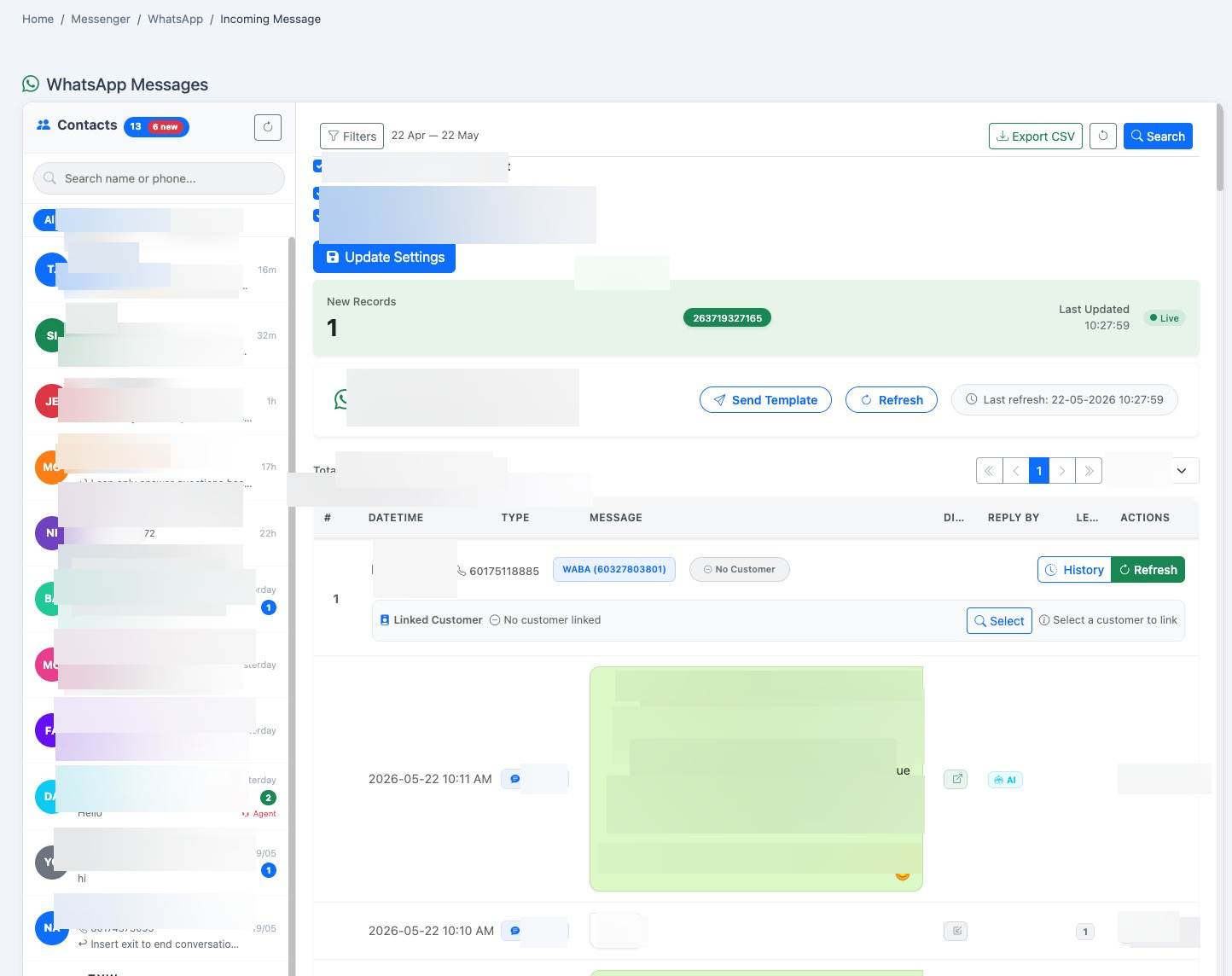
The main operational hub where your agents manage live WhatsApp conversations daily. Reply to customers, send templates, toggle AI, and link contacts to CRM records — all from one screen.

iCRM WhatsApp Inbox — live chat management with AI toggle, customer linking, and real-time message list

Live conversation list

All customer conversations with name, phone, last message preview, timestamp, and WABA number badge.

Real-time alerts

Auto-polls every 60 seconds for new messages. Shows "New" badges and notification count instantly.

Reply to customers

Type and send text messages directly to customers. Attach images, videos, documents, and audio files.

Send template messages

Send pre-approved WABA templates (marketing, utility, authentication) with parameter filling.

AI Chat toggle

Enable/disable AI auto-reply per company with one click. AI handles routine questions automatically.

BizCloud App forward

Auto-forward incoming messages to BizCloud mobile app for push notifications to your agents.

Customer CRM linking

Link WhatsApp contacts to existing CRM customer records with quick Edit and Service Record shortcuts.

24-hour session detection

Detects expired WhatsApp sessions (>24h) and disables reply, prompting template send instead.

Advanced filters & search

Filter by date range (11 presets), phone number, AI level, agent assignment. Server-side search.

WA Analytics — Performance & KPI Reports

The most comprehensive WhatsApp analytics in any CRM. Three tabbed sections with 9+ interactive charts covering volume, response times, agent performance, SLA compliance, and AI vs human analysis.

Tab 1: Overview Dashboard

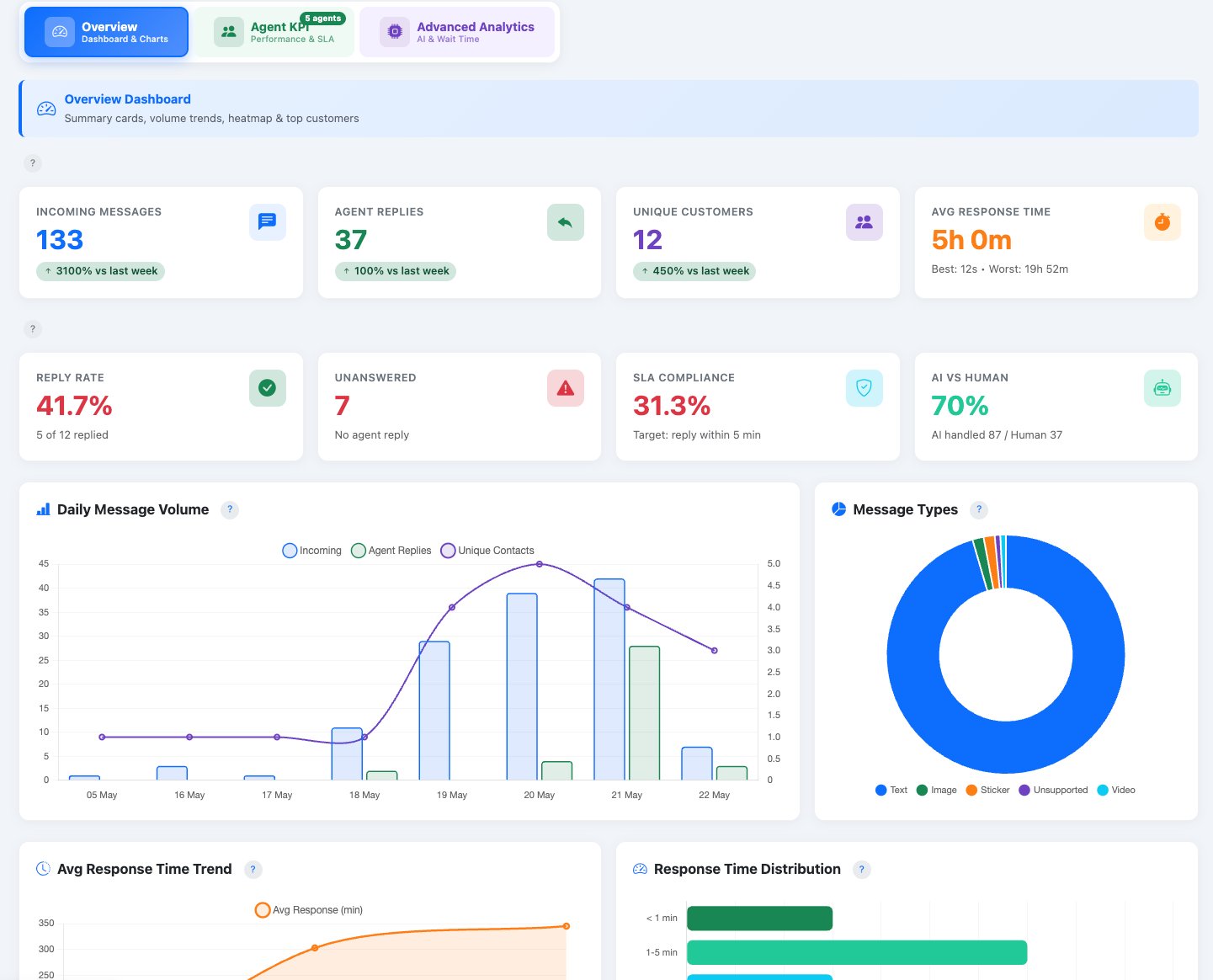
Summary KPI cards, daily volume chart, message type distribution, response time trends, peak hours, day-of-week analysis, conversation heatmap, and top 20 customers.

iCRM WhatsApp Analytics Overview — KPI cards, daily volume chart, message types, response time trend
Tab 2: Agent KPI & Performance

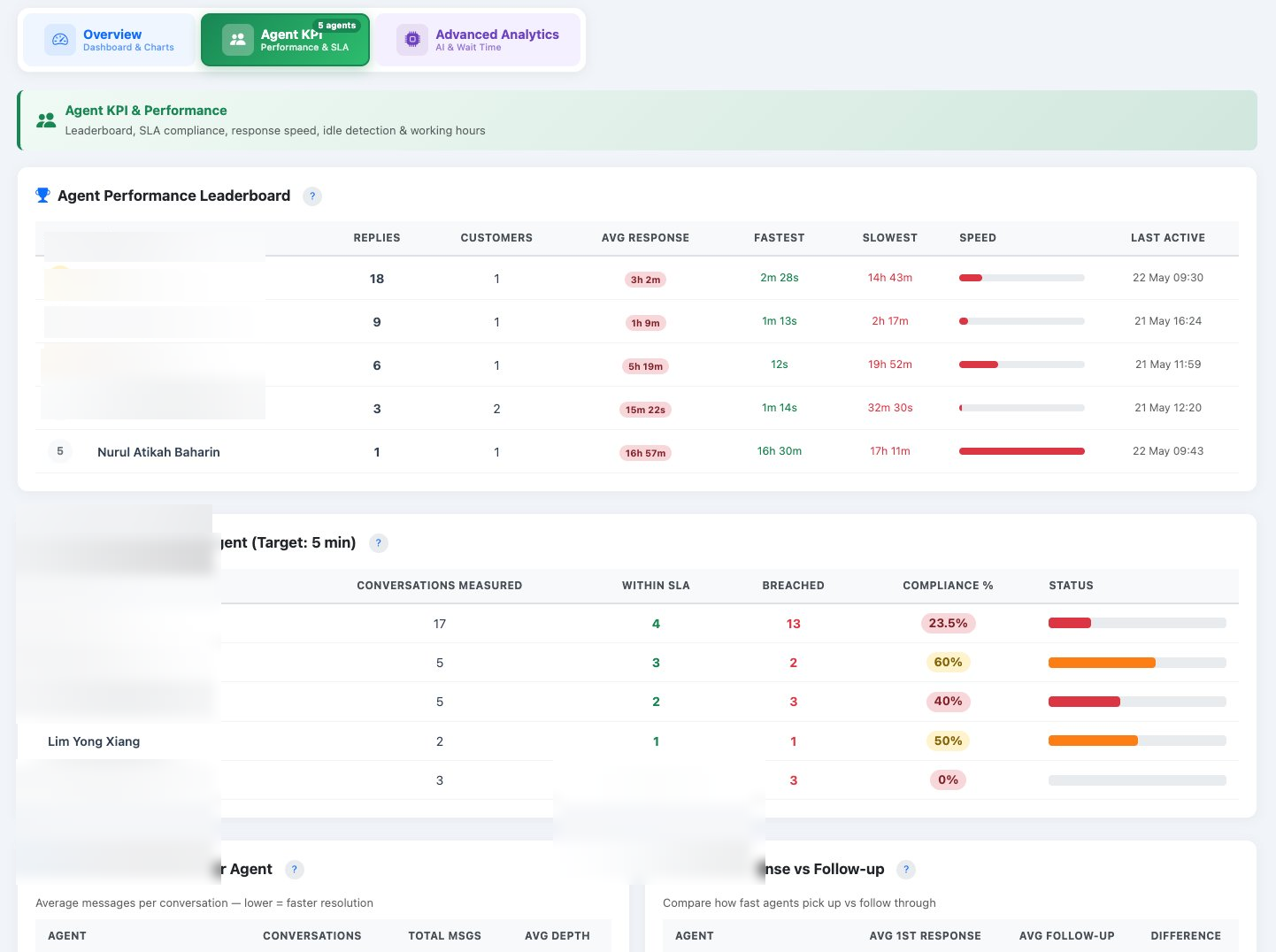
Agent performance leaderboard ranked by replies, SLA compliance per agent with visual status bars, conversation depth analysis, first response vs follow-up time comparison, and idle detection during working hours.

iCRM WhatsApp Agent KPI — leaderboard, SLA compliance, response speed, idle detection
Tab 3: Advanced Analytics

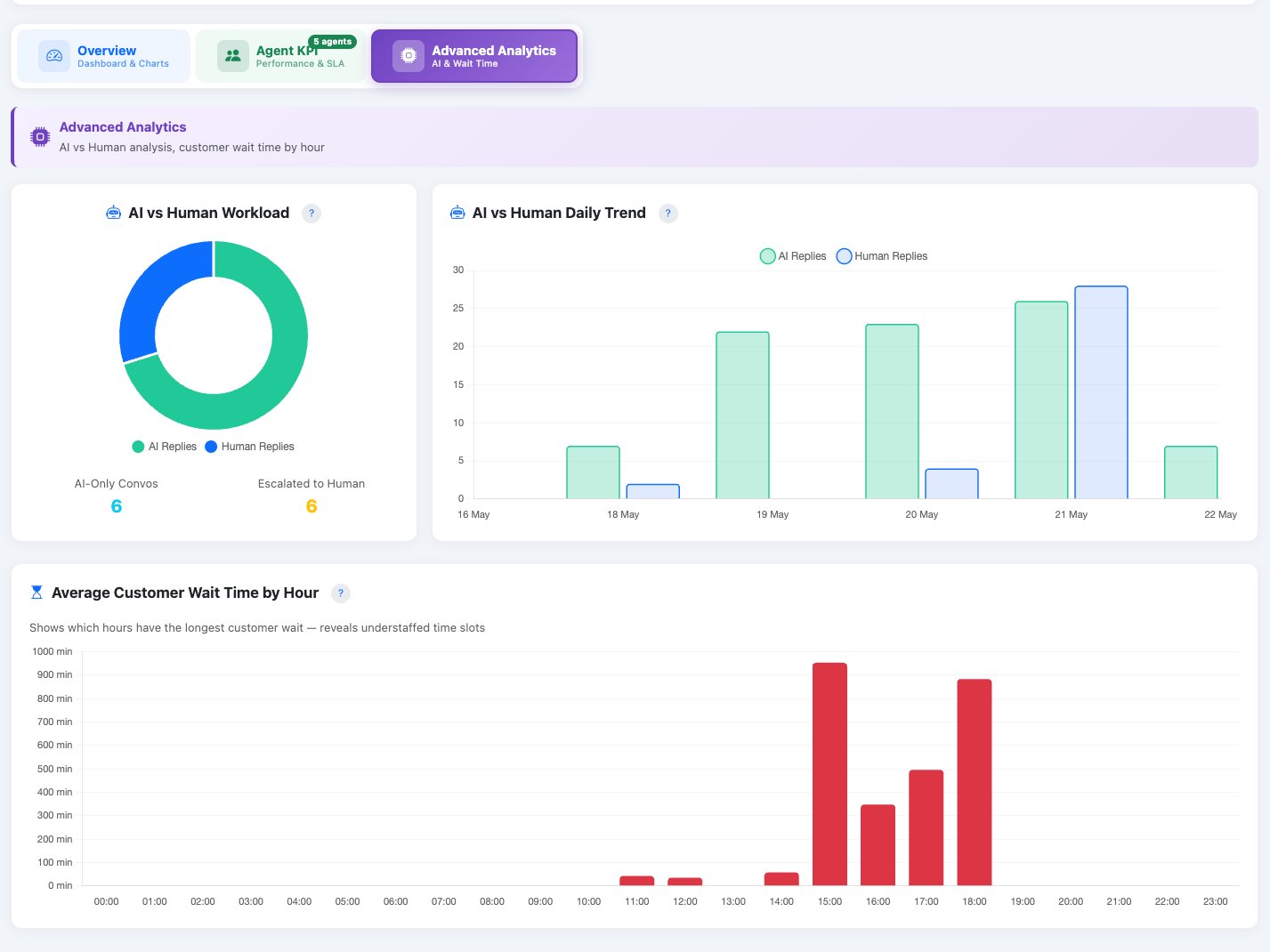
AI vs Human workload split, AI vs Human daily trend, AI handoff rate, and average customer wait time by hour — reveals understaffed time slots and AI efficiency.

iCRM WhatsApp Advanced Analytics — AI vs Human split, daily trend, customer wait time by hour

8 KPI summary cards

Incoming messages, agent replies, unique customers, avg response time, reply rate, SLA compliance, unanswered count, and AI vs human ratio.

Conversation heatmap

24x7 grid (Hour x Day-of-Week) with colour-coded intensity showing when customers are most active.

Agent leaderboard

Ranked by reply count with avg/fastest/slowest response time and visual speed bar (green/orange/red).

SLA compliance tracking

Conversations measured, within SLA count, breached count, compliance %, and configurable SLA target.

AI vs Human analysis

Proportion of AI auto-replies vs human replies. AI handoff rate. Estimated cost savings from AI handling.

Wait time by hour

Bar chart showing average customer wait time by hour of day — colour-coded to reveal understaffed slots.
WA Conversations — Chat History Browser

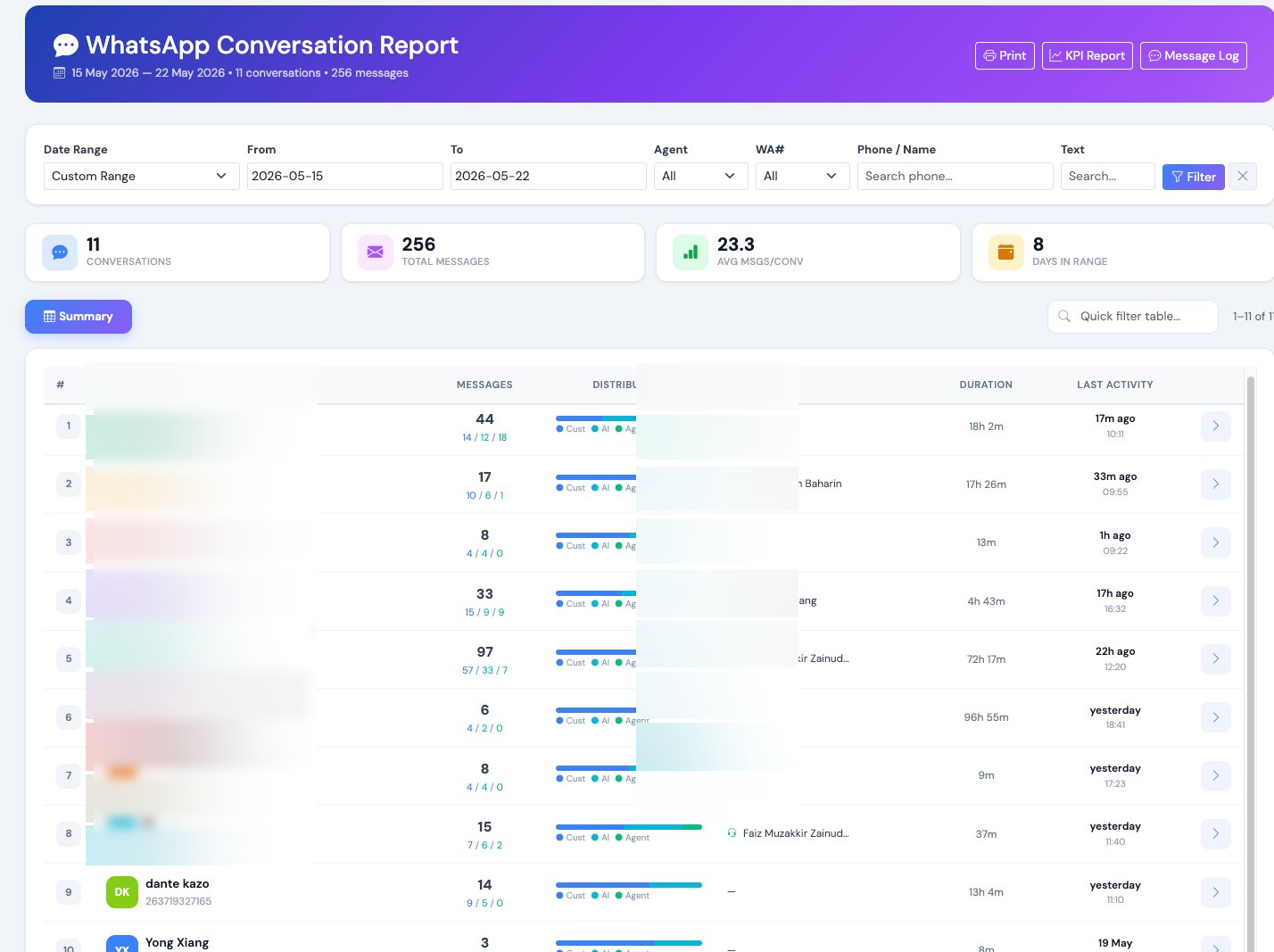
Browse and read complete conversation threads. Review customer interactions, quality-check agent responses, and audit AI behaviour — all in a clean chat-style view with message distribution bars.

iCRM WhatsApp Conversation Report — chat history browser with message distribution and agent assignment

Chat-style view

Messages displayed in a clean chat format with sender identification (Customer / AI / Agent name).

Message distribution bars

Visual bars showing the ratio of customer vs agent vs AI messages per conversation at a glance.

Quick stats & summary

Summary cards showing total conversations, messages, average msgs per conversation, and days in range.

Multi-filter search

Filter by date range, agent, WABA number, phone number, and text content.

Customer details

Shows linked customer name, phone number, WABA number, and assigned agent for each conversation.

Keyboard shortcuts

Navigate between conversations efficiently with keyboard — designed for QA team daily workflow.

WA Billing — Usage & Cost Tracking

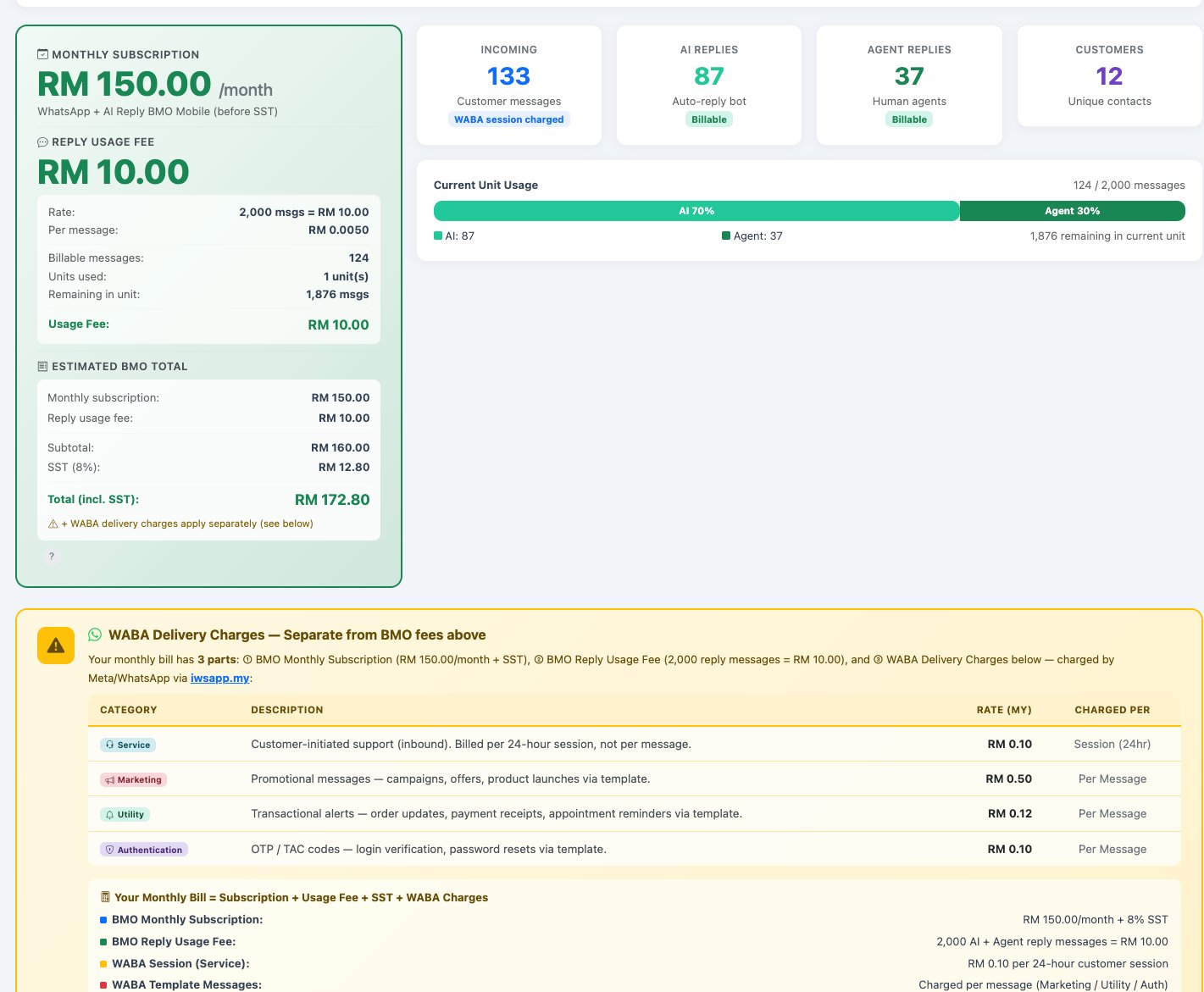
Full transparency on your WhatsApp costs. See your monthly subscription, reply usage fees, and WABA delivery charges broken down in one clear report. Know exactly what you are paying for.

iCRM WhatsApp Billing — 3-tier cost model, subscription, usage fee, WABA delivery charges

Tier 1: Monthly Subscription

RM 150/month

Fixed platform fee for iCRM + WhatsApp AI + BizCloud App. Plus 8% SST.

Tier 2: Reply Usage Fee

RM 10 per 2,000 msgs

Every 2,000 AI + agent outbound reply messages = RM 10. Customer incoming messages are NOT charged.

Tier 3: WABA Delivery

From RM 0.10/session

Service RM 0.10/session, Marketing RM 0.50/msg, Utility RM 0.12/msg, Auth RM 0.10/msg. Charged by iSMS.

Your monthly bill = Subscription + Reply Usage Fee + SST + WABA Charges. Everything is visible in this report — no hidden costs. See full pricing breakdown →

WA Dashboard — Executive Summary

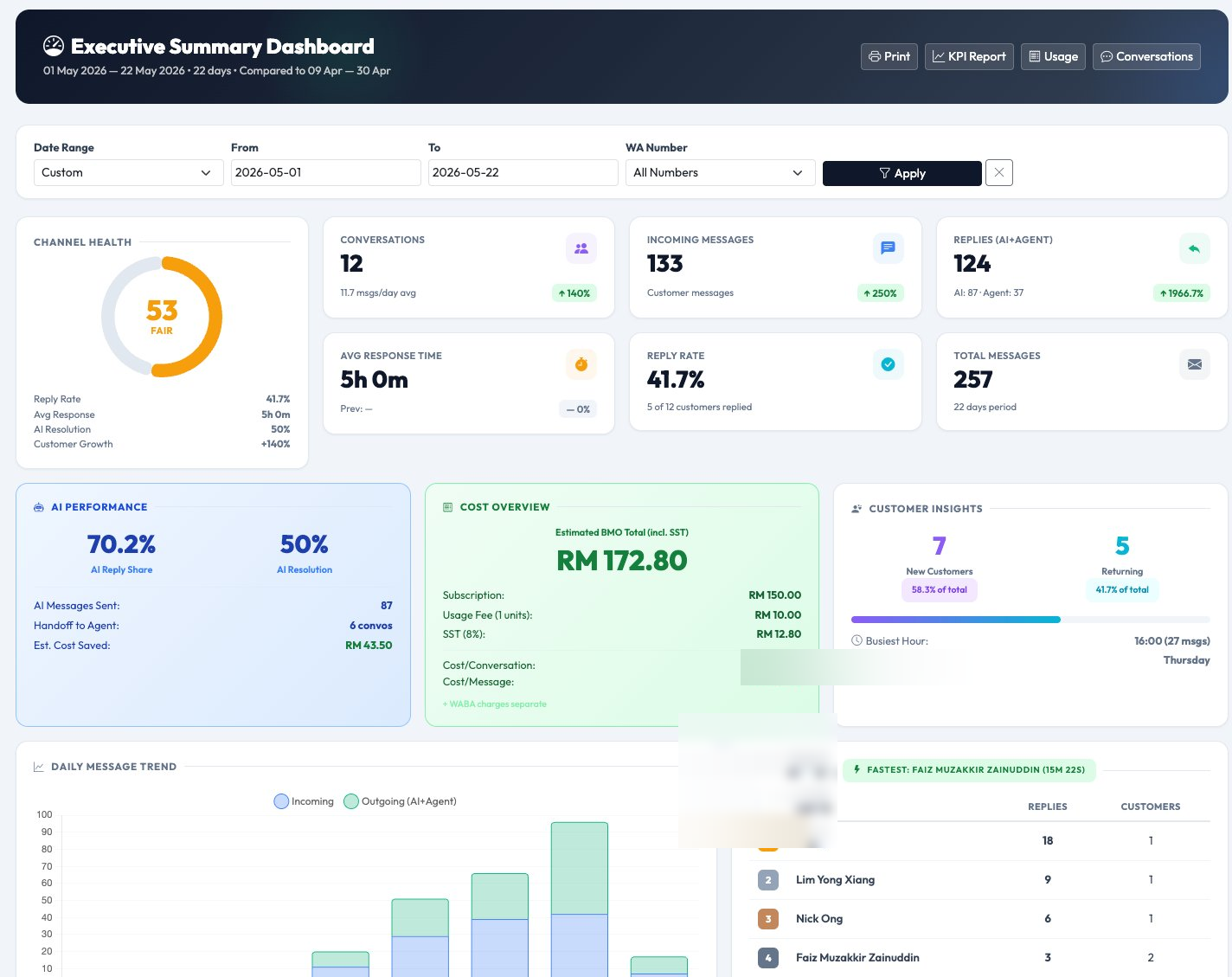
One-page management overview designed for CEO and business owners. Combines the most important metrics from all other reports into a single elegant dashboard with month-over-month comparison.

iCRM WhatsApp Executive Dashboard — channel health score, KPI metrics, AI performance, cost overview, top agents

Channel Health Score (0-100)

Composite metric combining Reply Rate (30%), Response Speed (30%), AI Resolution Rate (20%), Customer Growth (20%). Animated doughnut ring, colour-coded.

Period-over-period comparison

Automatically calculates previous period of equal length. Every metric shows trend arrows with percentage change.

AI Performance card

AI Reply Share %, AI Resolution Rate %, messages sent, handoff to agent count, and estimated cost savings from AI.

Cost Overview card

Estimated total (incl. SST), subscription breakdown, usage fee with unit count, cost per conversation, cost per message.

Customer Insights

New vs Returning customer split with percentage bar, busiest hour, and busiest day of week.

Top 5 Agents

Ranked by reply count with customers served and fastest responder badge. Quick performance check.

How iCRM compares to typical WhatsApp CRM tools

Feature iCRM WhatsApp Module Typical competitors
AI + Human hybrid chat✓ Built-in, one-click toggleRequires separate AI tool
Agent KPI & SLA tracking✓ 20+ metrics with leaderboardBasic or none
Conversation heatmap✓ Hour x Day gridRare
Customer CRM linking✓ Native CRM integrationSeparate systems needed
Transparent 3-tier billing✓ Full cost visibilityHidden costs common
Executive health score (0-100)✓ Composite metricNot available
AI cost savings tracking✓ Automatic calculationManual tracking
Multi-WABA number support✓ Multiple numbersSingle number only
Period comparison (auto)✓ Automatic MoMManual export needed
Agent idle detection✓ Gaps > 30min flaggedNot available
Conversation depth analysis✓ Msgs per customer per agentNot available
BizCloud App mobile forwarding✓ iOS & Android pushEmail notification only

Ready to upgrade your WhatsApp operations?

Start with a free trial. Our team sets everything up — WhatsApp API connection, AI knowledge base, agent accounts — all within 24 hours.

Start free trial → WhatsApp us