AlienVoIP Cloud PBX connection
Bring supported AlienVoIP PBX call data directly into the iCRM analytics environment.
Connect an AlienVoIP Cloud PBX to iCRM, map extensions to users and analyse every call through CDR dashboards, agent scorecards, missed-call visibility, contact patterns and capacity insight—without leaving the CRM.
Connect an AlienVoIP Cloud PBX to iCRM, map extensions to users and analyse every call through CDR dashboards, agent scorecards, missed-call visibility, contact patterns and capacity insight—without leaving the CRM.
Bring supported AlienVoIP PBX call data directly into the iCRM analytics environment.
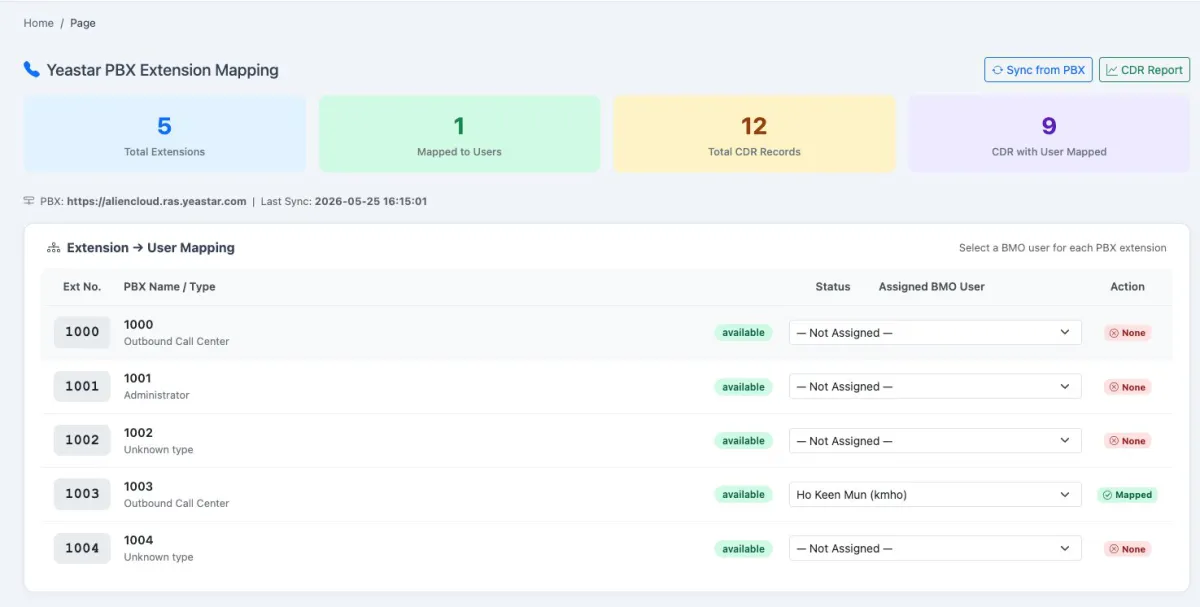
Sync the extension directory from the connected PBX and display the last successful synchronisation time.
Assign each PBX extension to the correct iCRM user from a simple dropdown.
Use extension mapping to attribute CDR activity to the employee who made or received the call.
Open a management dashboard that turns raw call detail records into readable call-health indicators.
Filter by date range, from and to dates, user, call type and call status.
See the overall number of recorded calls and compare volume with the previous period.
Measure how many calls were answered and the resulting answer-rate percentage.
Surface unanswered or failed calls so customer follow-up can begin quickly.
Review productive talk time together with average talk time per call.
Separate inbound, outbound and internal call activity.
Measure how long callers wait before a call is answered.
Keep recent unanswered inbound calls visible for operational review.
Compare inbound, outbound and internal call activity by day.
Track talk minutes and answer-rate movement across the selected period.
Understand answered versus missed outcomes alongside inbound and outbound mix.
Identify when calls are concentrated so managers can plan coverage.
View hour-by-day activity patterns in a compact operational grid.
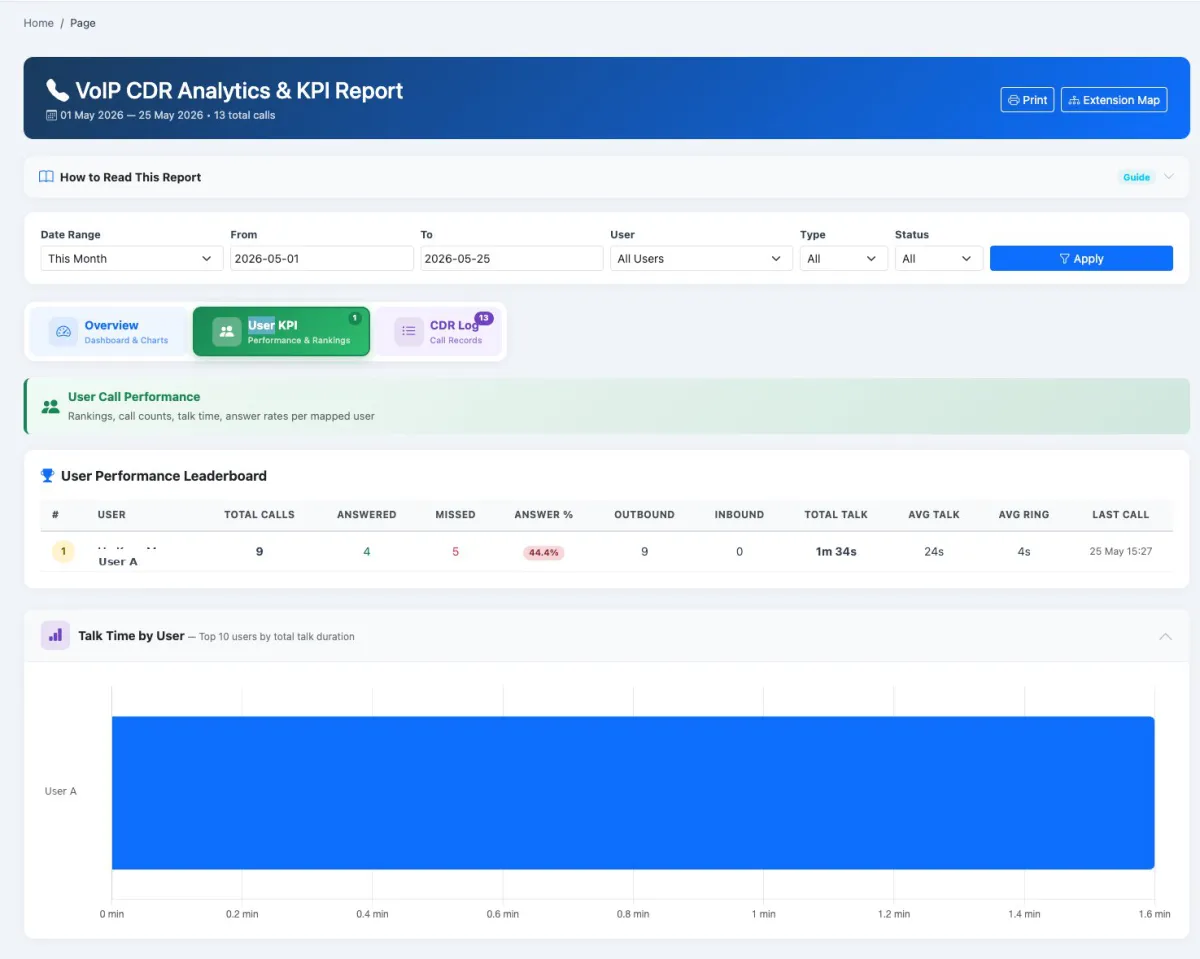
Rank mapped users by total calls, answer rate, talk time and direction of activity.
Use colour-coded performance badges to spot strong coverage and agents needing attention.
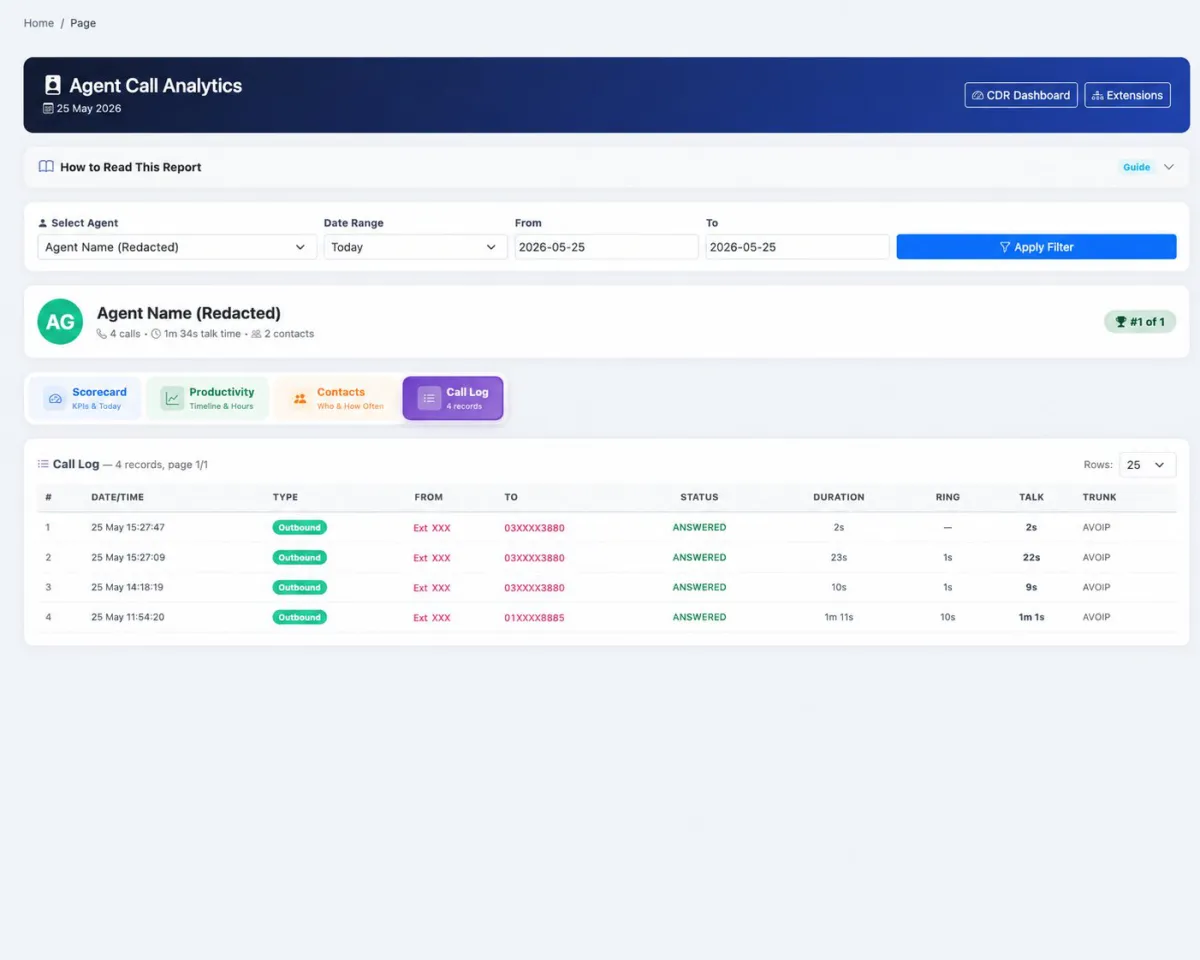
Search and filter the underlying call records instead of relying only on summary charts.
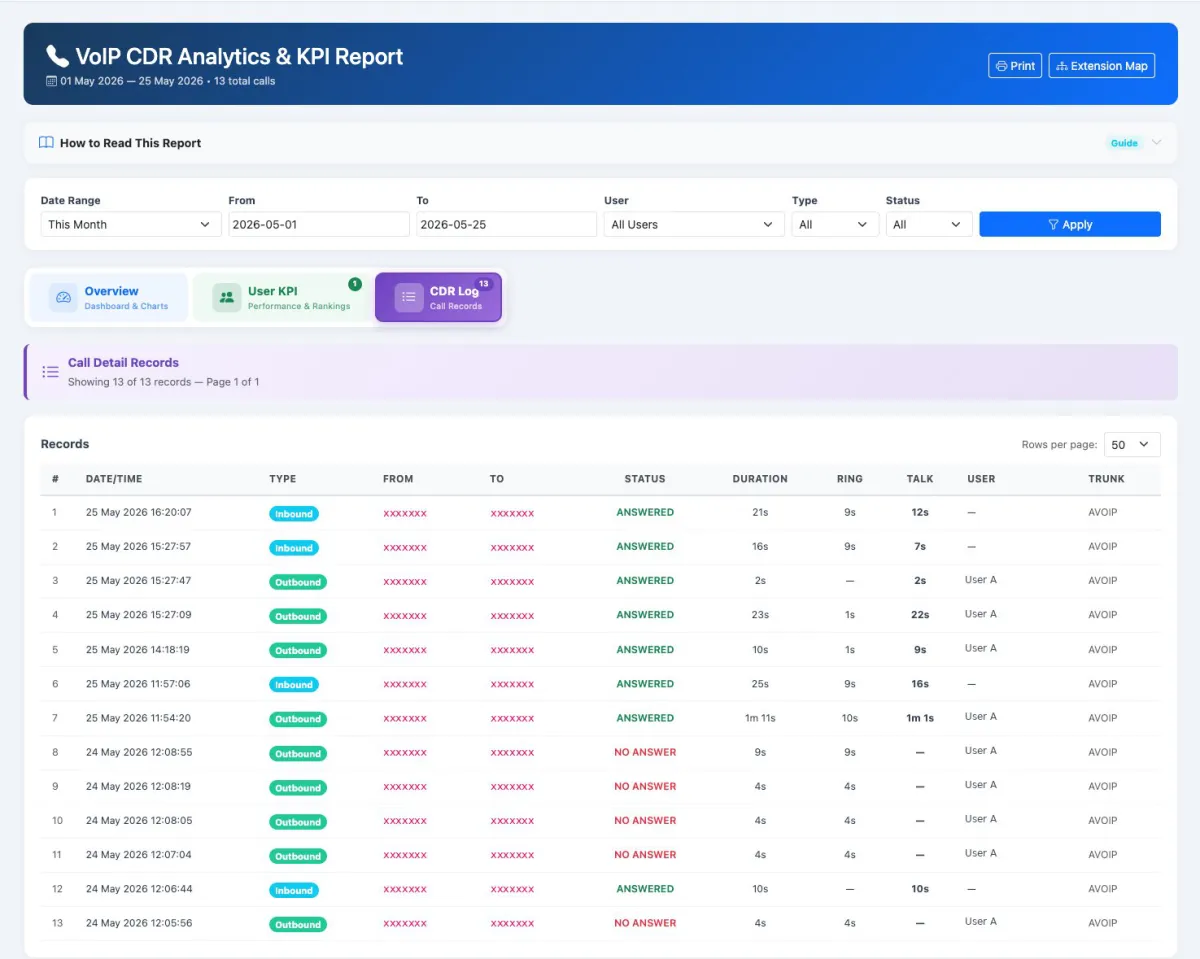
Retain date and time, type, source, destination, status, duration, ring time, talk time, assigned user and trunk.
Open a 360-degree view of one agent’s call workload and outcomes.
See calls, answered count, talk time, first call, last call and comparison with yesterday.
Review active days, average active time, earliest start and latest end.
Find extended periods without call activity and identify the longest gap.
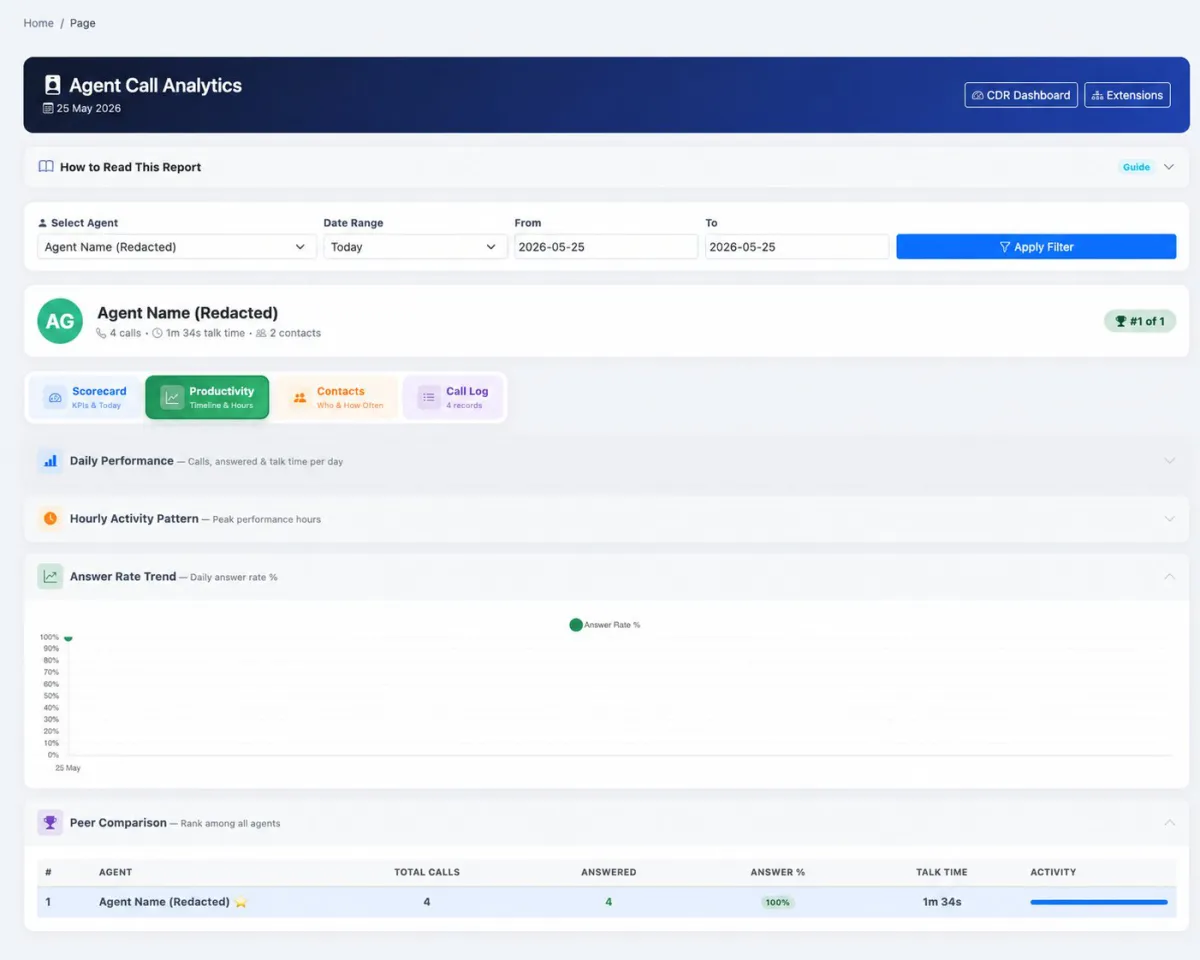
Analyse daily performance, answer-rate trends and activity across the selected period.
Compare the selected agent with colleagues while keeping that agent highlighted.
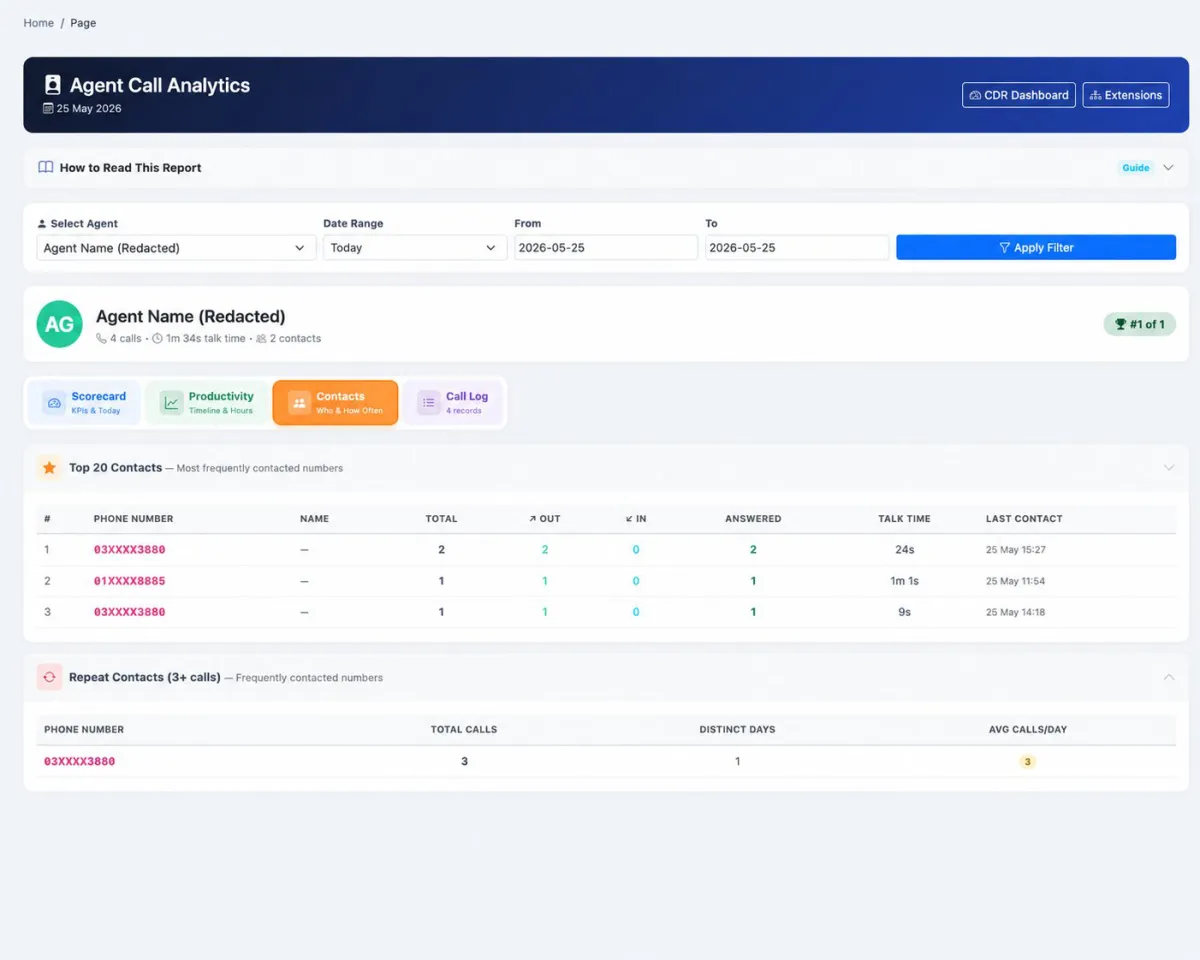
See the most frequently called numbers, repeat contacts and inbound-versus-outbound relationship.
Drill down from an agent scorecard to the complete CDR records for that user.
Use matching phone numbers to relate call activity to the customer records managed in iCRM.
Print management views and use the report’s built-in guide to explain how the KPIs should be read.
When your AlienVoIP Cloud PBX is connected, iCRM turns call detail records into a shared operational view. Managers can understand overall call health, inspect the underlying evidence and coach each mapped user from the same CRM environment used for customer work.
Synchronise the extension list from the connected AlienVoIP Cloud PBX, then assign each extension to an iCRM user. The mapping creates the ownership needed for fair user KPIs, individual scorecards and complete call records.
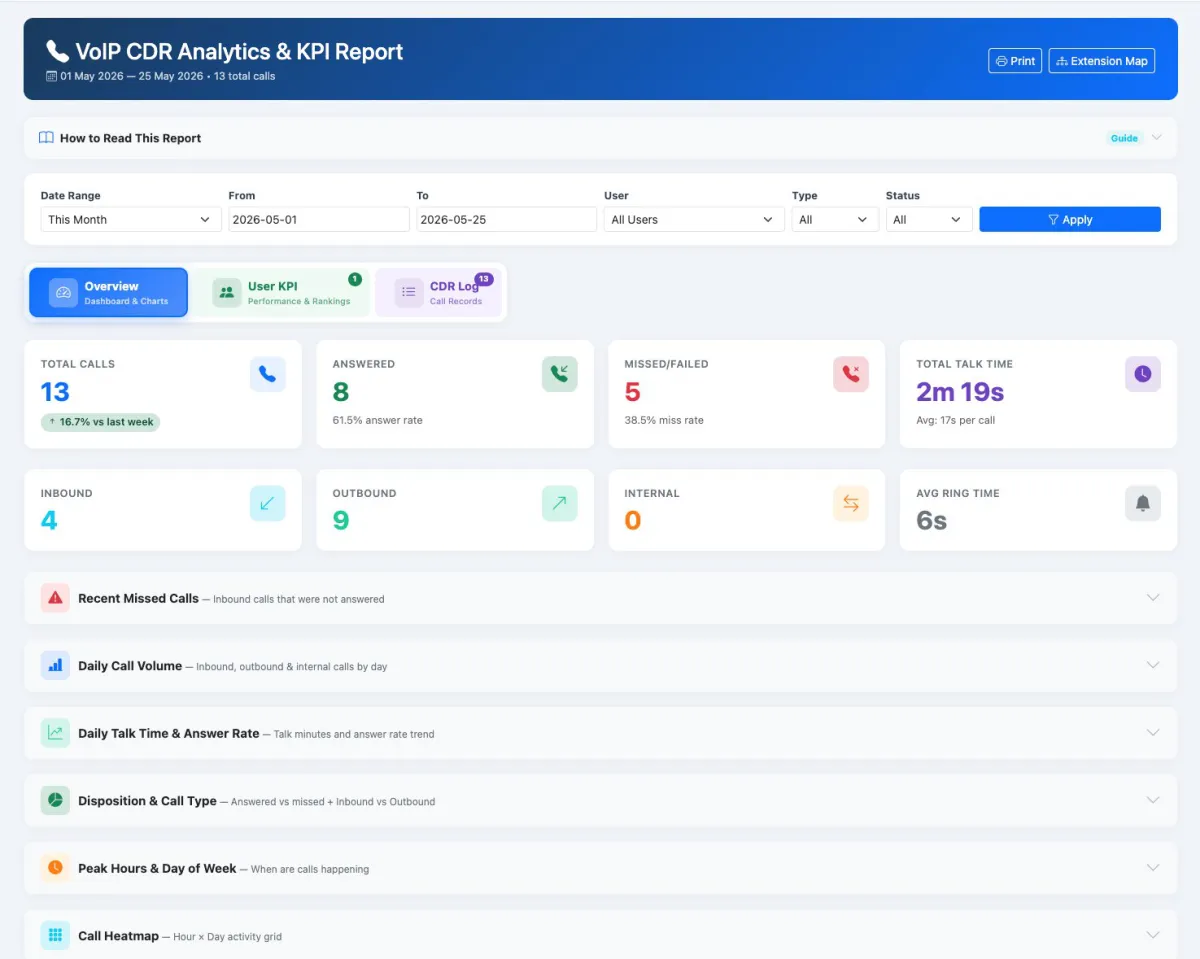
The VoIP CDR Analytics and KPI report starts with eight clear indicators and expands into missed calls, daily volume, talk-time trends, call outcomes, peak periods and a call heatmap. Filters keep the view relevant to a chosen period, user, type or status.
The user KPI view ranks activity and answer performance across mapped staff. When the result needs investigation, the CDR Log exposes the individual call records—source, destination, outcome, duration, ring, talk time, user and trunk—behind the summary.
Select an agent and period to review today’s activity, call outcomes, direction, talk time, longest call and unique contacts. Working-hours analysis adds active span, earliest start, latest end and idle gaps to the performance picture.
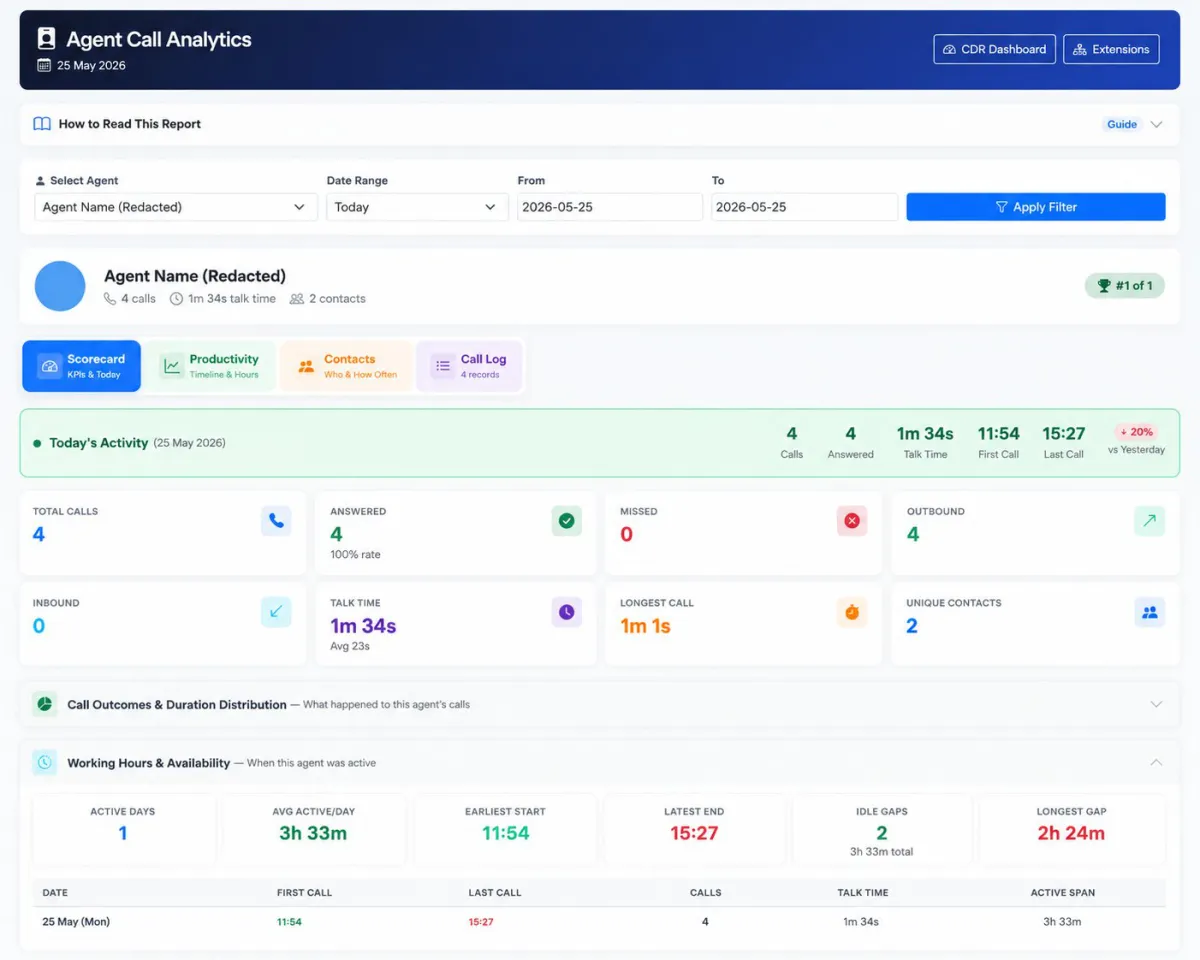
Three supporting views explain how performance developed: the productivity timeline shows daily change and peer position; Contacts surfaces frequently called and repeat numbers; Call Log preserves the complete individual CDR trail.
Use the connected records to move daily management from assumptions to observable call behaviour.
Track volume by day, week or selected reporting period.
See what proportion of calls reached a successful answer.
Identify unanswered inbound demand requiring follow-up.
Compare productive phone time with call count and outcomes.
Understand how long callers wait before someone responds.
Find busy hours and days for more informed coverage planning.
Compare call handling without relying on self-reported activity.
Review extended inactivity within the observed working span.
See which customer numbers recur most often for each agent.
Understand the distribution of short, typical and long calls.
Once the technical connection is available, the operational setup is centred on extension ownership and consistent KPI review.
Link the supported AlienVoIP Cloud PBX account to the iCRM environment.
Retrieve the PBX extension directory and confirm the last-sync information.
Assign every working extension to the correct iCRM employee.
Check that CDR records appear with the expected type, status, duration and ownership.
Monitor answered, missed, talk-time, direction and ring-time KPIs.
Use missed-call panels and the full CDR log to find records needing action.
Use agent scorecards, peak periods, contacts and idle gaps to improve coverage and follow-up.
Explore how the screens and functions in AlienVoIP Cloud PBX Analytics support setup, daily operations and continuous improvement.
Bring supported AlienVoIP PBX call data directly into the iCRM analytics environment.
Sync the extension directory from the connected PBX and display the last successful synchronisation time.
Assign each PBX extension to the correct iCRM user from a simple dropdown.
Use extension mapping to attribute CDR activity to the employee who made or received the call.
Open a management dashboard that turns raw call detail records into readable call-health indicators.
Filter by date range, from and to dates, user, call type and call status.
See the overall number of recorded calls and compare volume with the previous period.
Measure how many calls were answered and the resulting answer-rate percentage.
Surface unanswered or failed calls so customer follow-up can begin quickly.
Review productive talk time together with average talk time per call.
Separate inbound, outbound and internal call activity.
Measure how long callers wait before a call is answered.
Keep recent unanswered inbound calls visible for operational review.
Compare inbound, outbound and internal call activity by day.
Track talk minutes and answer-rate movement across the selected period.
Understand answered versus missed outcomes alongside inbound and outbound mix.
Identify when calls are concentrated so managers can plan coverage.
View hour-by-day activity patterns in a compact operational grid.
Rank mapped users by total calls, answer rate, talk time and direction of activity.
Use colour-coded performance badges to spot strong coverage and agents needing attention.
Search and filter the underlying call records instead of relying only on summary charts.
Retain date and time, type, source, destination, status, duration, ring time, talk time, assigned user and trunk.
Open a 360-degree view of one agent’s call workload and outcomes.
See calls, answered count, talk time, first call, last call and comparison with yesterday.
Review active days, average active time, earliest start and latest end.
Find extended periods without call activity and identify the longest gap.
Analyse daily performance, answer-rate trends and activity across the selected period.
Compare the selected agent with colleagues while keeping that agent highlighted.
See the most frequently called numbers, repeat contacts and inbound-versus-outbound relationship.
Drill down from an agent scorecard to the complete CDR records for that user.
Use matching phone numbers to relate call activity to the customer records managed in iCRM.
Print management views and use the report’s built-in guide to explain how the KPIs should be read.
Link the supported AlienVoIP Cloud PBX to iCRM.
Retrieve PBX extensions and assign each one to an iCRM user.
Bring call detail records into the connected reporting workspace.
Review call health, missed calls, CDR evidence and individual agent performance.
Follow up missed demand, coach agents and plan staffing around real call patterns.
Tell us how your team works today. We’ll demonstrate the modules that matter most.
Book your personalised demo →