Central sender-channel setup
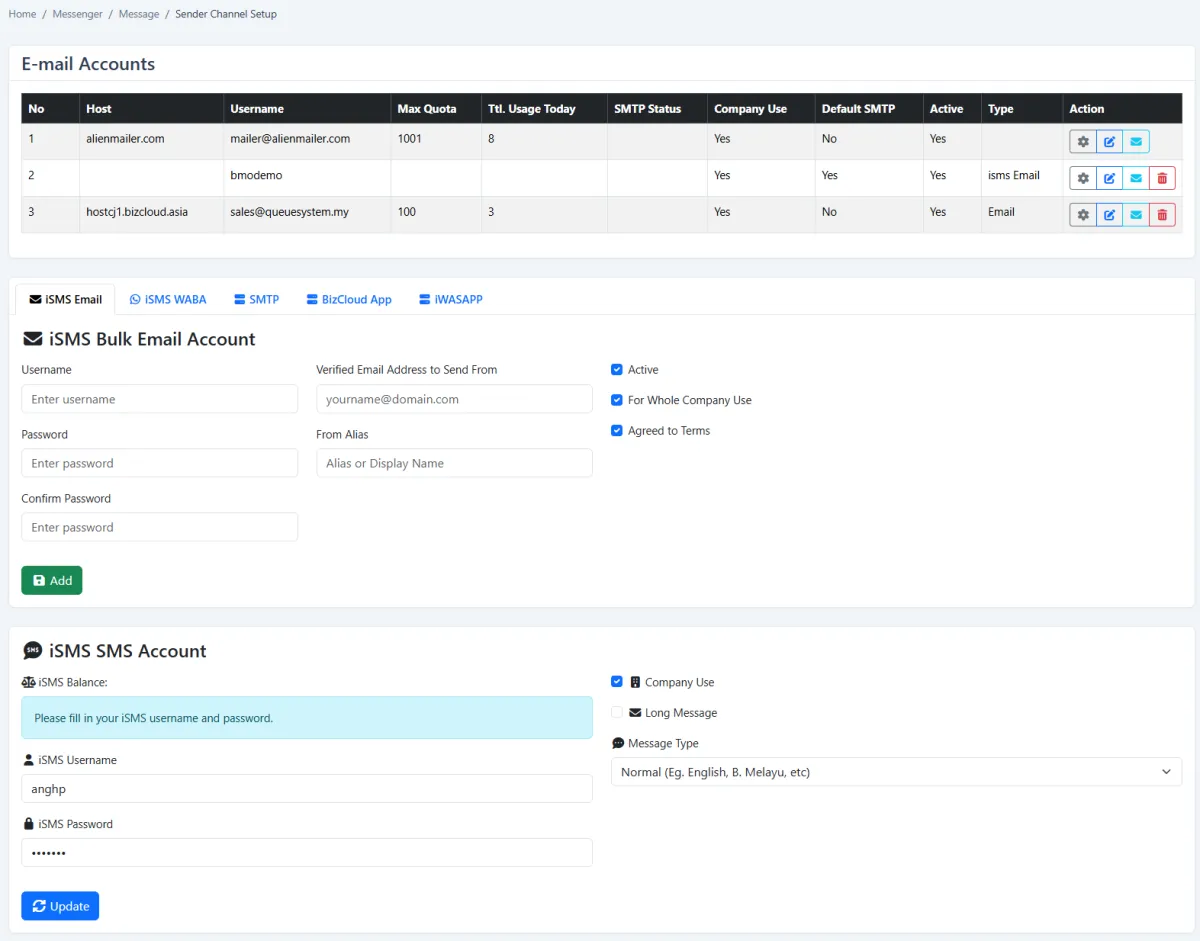
Maintain outbound accounts from one configuration area instead of scattering credentials across separate tools.
Configure WhatsApp Business API, SMS, SMTP and company email accounts, choose the right delivery channel for each audience, run messaging campaigns and automate operational reminders.
Configure WhatsApp Business API, SMS, SMTP and company email accounts, choose the right delivery channel for each audience, run messaging campaigns and automate operational reminders.
Maintain outbound accounts from one configuration area instead of scattering credentials across separate tools.
Connect the iSMS WABA channel for approved WhatsApp Business messaging.
Configure an iSMS SMS account, check its balance and define normal or long-message behaviour.
Register SMTP or general email senders with host, username, quota, active status and company-use controls.
Configure iSMS bulk email with a verified sender address, display alias and company-wide availability.
Choose a default SMTP account while retaining other active accounts for different campaigns.
Send messages and operational reports directly through the BizCloud companion app.
Add another delivery method when a communication workflow needs a channel beyond the standard choices.
Choose one or several appropriate channels across WhatsApp, SMS, email and BizCloud delivery.
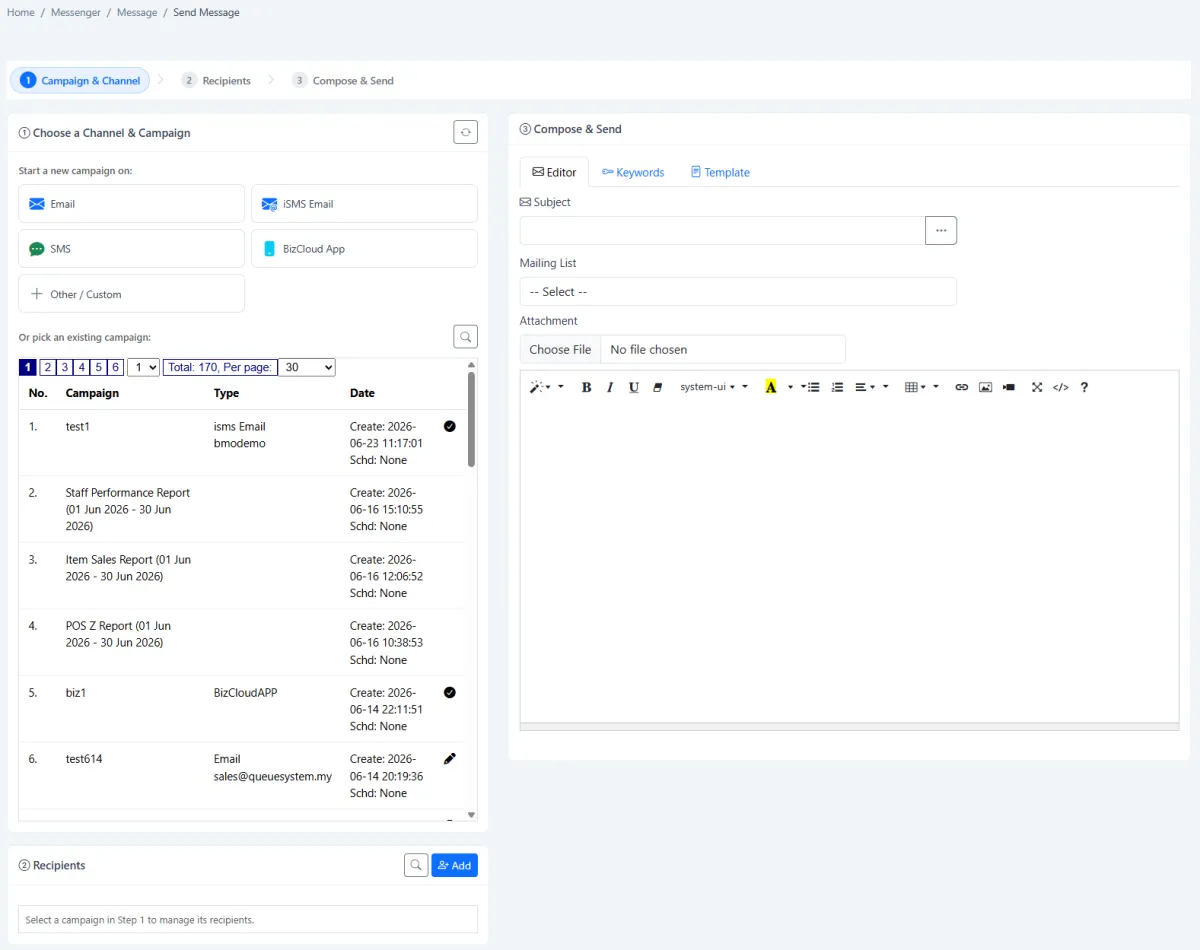
Move clearly through campaign and channel, recipients, then compose and send.
Select an existing campaign to continue its recipient and message workflow instead of starting again.
Search for recipients, add them to the selected campaign and organise the intended audience.
Select a prepared mailing list for efficient group communication.
Create a subject and formatted body with links, images, tables, lists and other editor controls.
Use keywords and reusable templates to make repeated communication faster and more consistent.
Attach supporting files to email-oriented campaign communication when required.
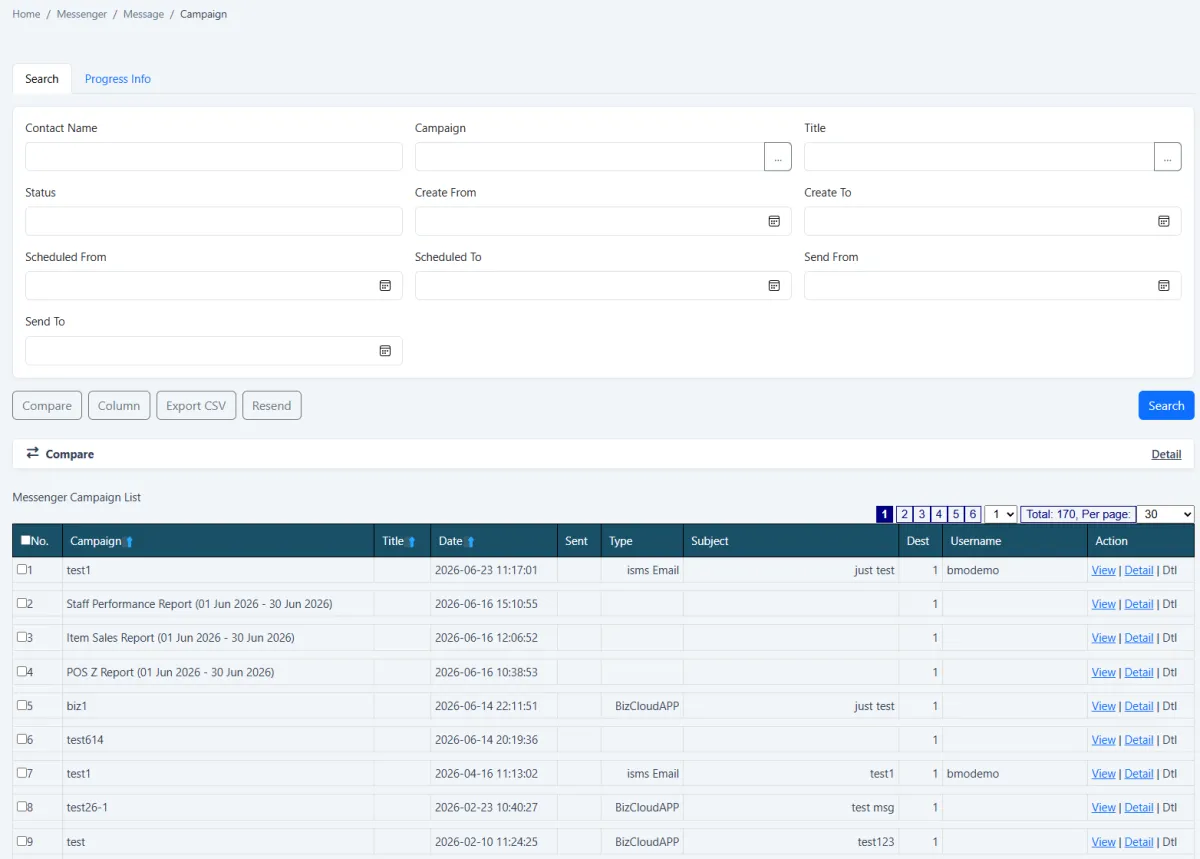
Keep campaign, date, type, subject, destination count and sending account together in one searchable list.
Open progress information, view campaign records and inspect delivery detail.
Filter campaigns by contact, title, status and date, compare results and export the list to CSV.
Select an existing campaign record and use resend when a message needs to be issued again.
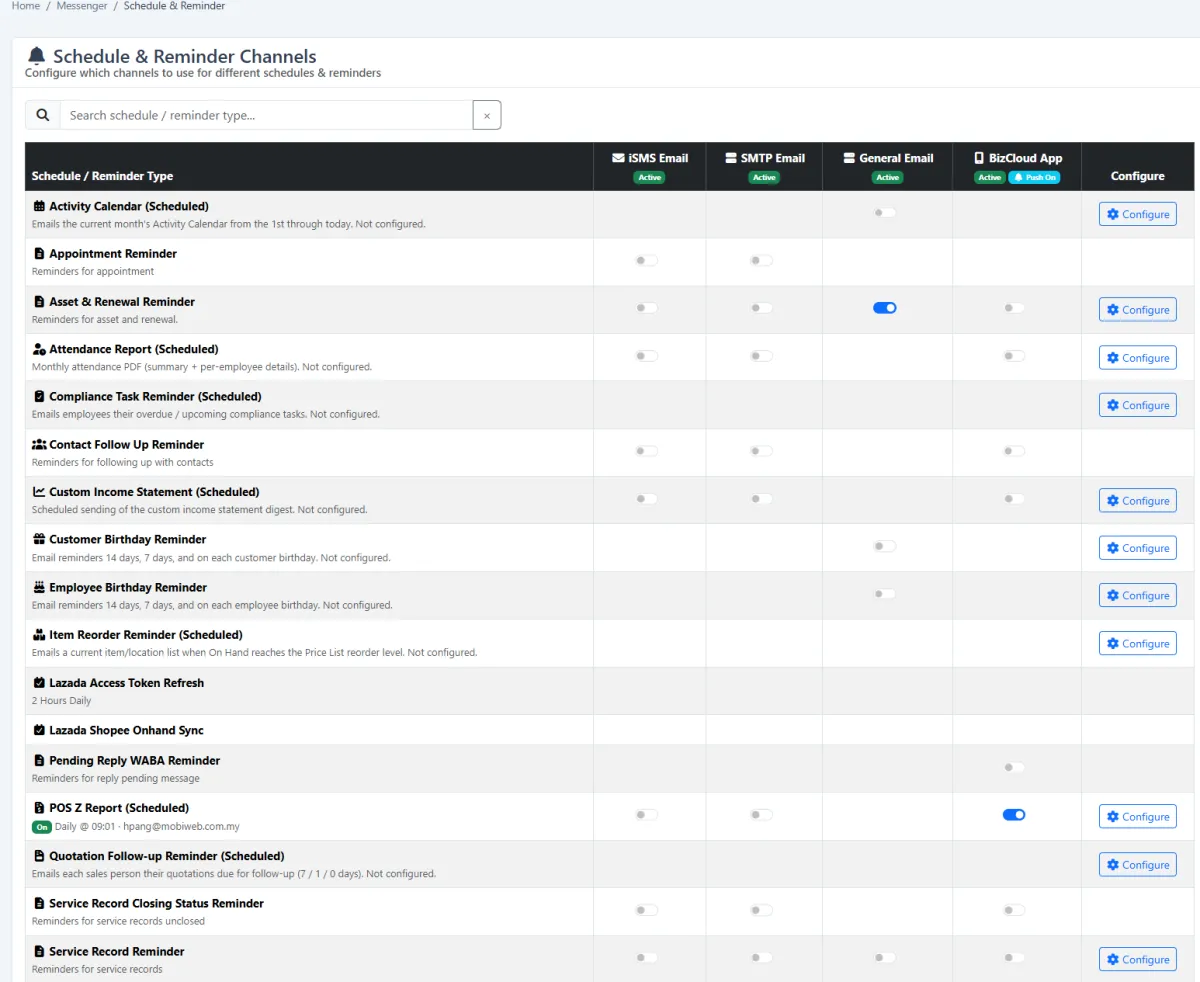
Choose which active channel should carry each type of scheduled report or reminder.
Support appointment, asset renewal, follow-up, birthday, item reorder, quotation and service-record reminders from the same control centre.
iCRM connects sender-account governance, audience selection, message composition, campaign history and operational reminders. Your team can choose the channel that fits the communication while keeping the work visible in one system.
The sender-channel setup brings together email, iSMS email, WhatsApp Business API, SMTP, BizCloud App and other supported account types. Administrators can maintain active status, company availability, defaults and sending quotas from one place.
The guided workspace separates channel and campaign selection, recipient management, and composition. Start a campaign on email, iSMS email, SMS, BizCloud App or a custom channel; then add recipients and prepare the message in the same operational flow.
The campaign register records campaign name, title, date, sent state, channel type, subject, destination count and sending username. Search by contact, campaign, title, status and date range, then open progress or detail when a closer review is needed.
The reminder matrix lets administrators activate the suitable channel for each scheduled report or notification. Different workflows can use iSMS email, SMTP, general email or BizCloud App without forcing the whole company onto one delivery route.
The same channel controls can support everyday CRM, sales, service, people and inventory communication.
Remind customers before scheduled appointments through the configured channel.
Prompt colleagues to follow up contacts whose next action is due.
Notify salespeople when quotations reach their follow-up window.
Surface unclosed or due service records for operational attention.
Reach members before recurrence or access validity expires.
Warn owners before domains, licences and other renewable assets expire.
Send item and location information when stock reaches the reorder level.
Schedule customer and employee birthday reminders for timely engagement.
Set the foundation once, then use a repeatable workflow for one-off messages, reusable campaigns and recurring reminders.
Add WhatsApp Business API, SMS, SMTP, email or BizCloud accounts and mark approved accounts active.
Choose company-use and default sender settings, then check quota or balance where applicable.
Start a new campaign on the intended channel or reuse an existing campaign record.
Search and add recipients or select an appropriate mailing list.
Add subject, content, keywords, template and supporting attachment as needed.
Deliver the campaign or activate the correct channel for a scheduled reminder workflow.
Search campaign history, inspect progress and detail, compare, export or resend.
Explore how the screens and functions in Omnichannel Messenger support setup, daily operations and continuous improvement.
Maintain outbound accounts from one configuration area instead of scattering credentials across separate tools.
Connect the iSMS WABA channel for approved WhatsApp Business messaging.
Configure an iSMS SMS account, check its balance and define normal or long-message behaviour.
Register SMTP or general email senders with host, username, quota, active status and company-use controls.
Configure iSMS bulk email with a verified sender address, display alias and company-wide availability.
Choose a default SMTP account while retaining other active accounts for different campaigns.
Send messages and operational reports directly through the BizCloud companion app.
Add another delivery method when a communication workflow needs a channel beyond the standard choices.
Choose one or several appropriate channels across WhatsApp, SMS, email and BizCloud delivery.
Move clearly through campaign and channel, recipients, then compose and send.
Select an existing campaign to continue its recipient and message workflow instead of starting again.
Search for recipients, add them to the selected campaign and organise the intended audience.
Select a prepared mailing list for efficient group communication.
Create a subject and formatted body with links, images, tables, lists and other editor controls.
Use keywords and reusable templates to make repeated communication faster and more consistent.
Attach supporting files to email-oriented campaign communication when required.
Keep campaign, date, type, subject, destination count and sending account together in one searchable list.
Open progress information, view campaign records and inspect delivery detail.
Filter campaigns by contact, title, status and date, compare results and export the list to CSV.
Select an existing campaign record and use resend when a message needs to be issued again.
Choose which active channel should carry each type of scheduled report or reminder.
Support appointment, asset renewal, follow-up, birthday, item reorder, quotation and service-record reminders from the same control centre.
Connect and activate company-approved sender accounts.
Start a campaign or reuse an existing campaign record.
Select recipients, mailing list, subject, template, content and attachments.
Send now through the chosen channel or assign channels to scheduled reminders.
Search campaign history, inspect progress, compare, export or resend.
Tell us how your team works today. We’ll demonstrate the modules that matter most.
Book your personalised demo →