Answer questions 24/7 with AI, and pass complex chats to the right person.
WhatsApp Business API
WhatsApp for business, linked to every customer.
Connect the WhatsApp Business API to iCRM through iSMS. Send approved template messages and campaigns, let AI answer customers at any hour, and hand over to your team from one shared inbox with the full customer history.
24/7AI replies, with agent handover
One inboxshared by the whole team
From RM 0.10per message, pay as you use
What businesses use it for
One channel for sales, service and reminders.
Most of your customers already use WhatsApp every day. Meet them there, with the business controls a personal phone can't give you.
Send utility messages before bookings, classes or service visits.
Send approved marketing templates to the customer groups you choose.
Keep customers informed about quotations, deliveries and service progress.
Remind customers about renewals, instalments and outstanding invoices.
Send one-time codes and login confirmations as authentication messages.
Shared inbox
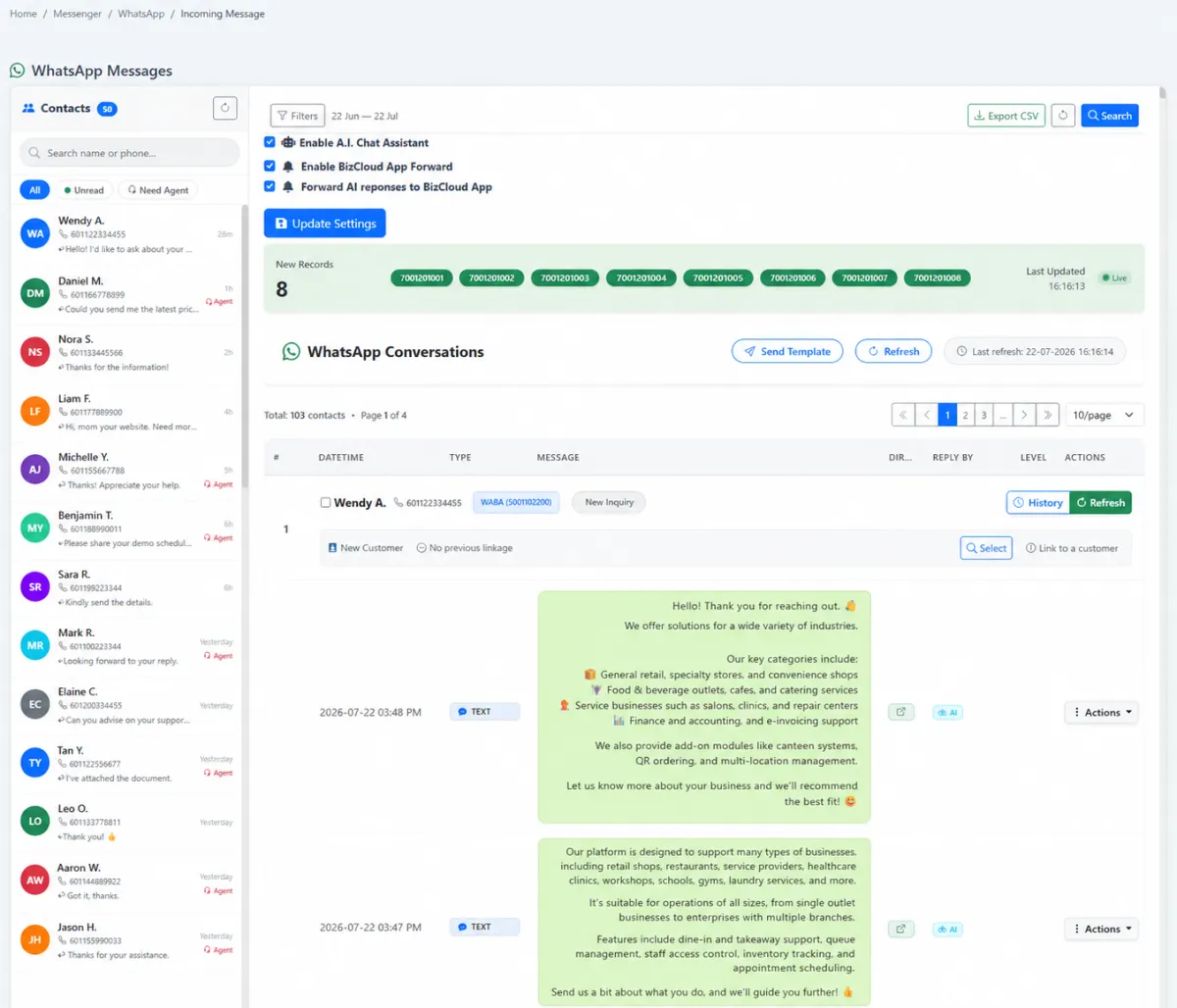
Every WhatsApp chat in one team inbox.
Incoming WhatsApp messages arrive in a shared iCRM inbox instead of on one person's phone. Filter unread and needs-agent chats, reply with attachments or approved templates, and link each sender to the right CRM customer.
- Unread and needs-agent queues
- Link a new sender to an existing customer
- Reply with attachments, emoji or approved templates
- Full conversation history with who replied, AI or agent
AI with a human handover
Let AI answer first. Keep your team in control.
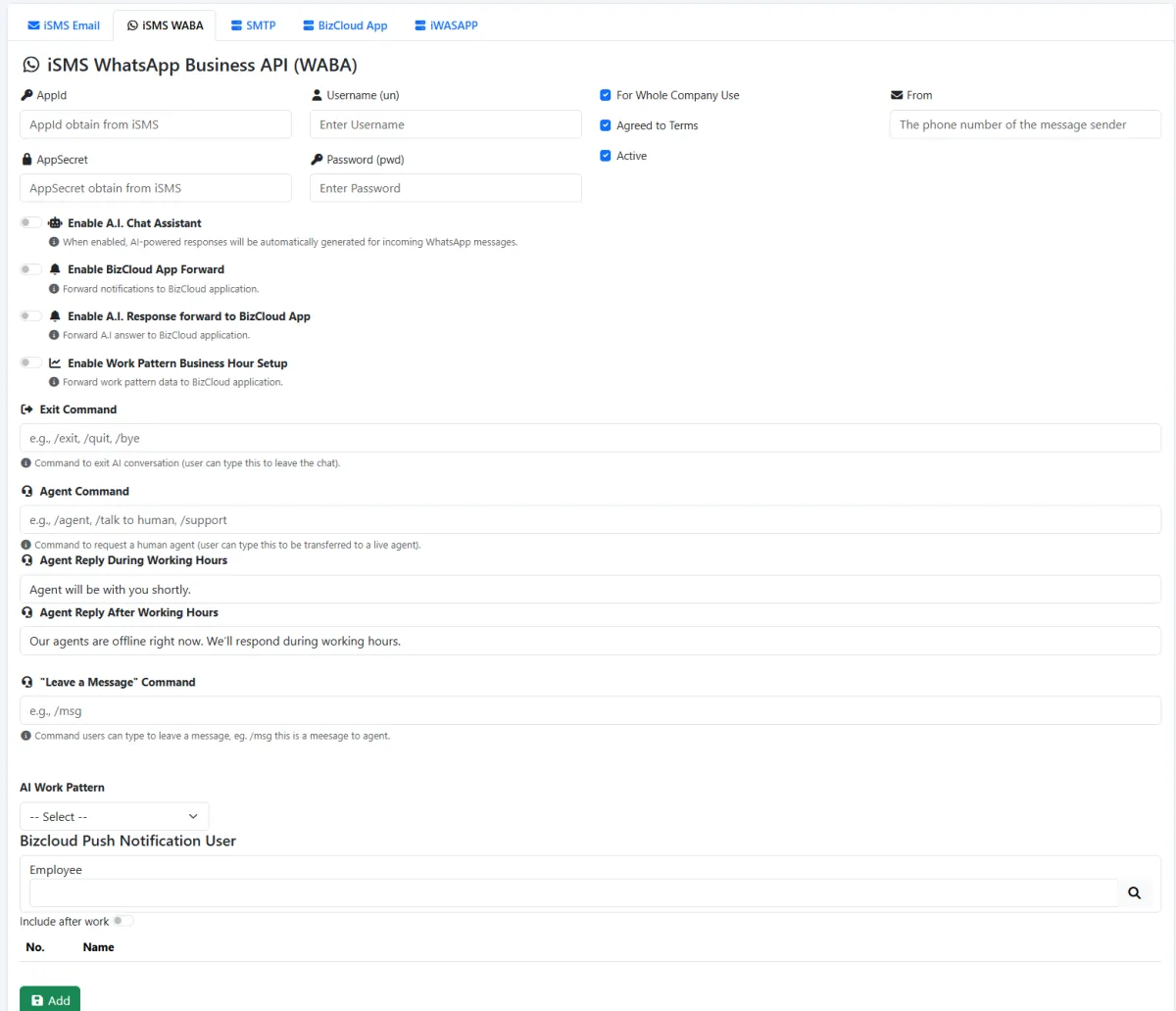
Turn on the AI assistant to reply to routine questions at any hour. Customers can ask for a person with a command such as /agent, and different messages can be sent during and after working hours.
- AI replies to incoming WhatsApp messages
- Agent, exit and leave-a-message commands
- Working-hours and after-hours responses
- Chat alerts forwarded to staff on the BizCloud app
Response performance
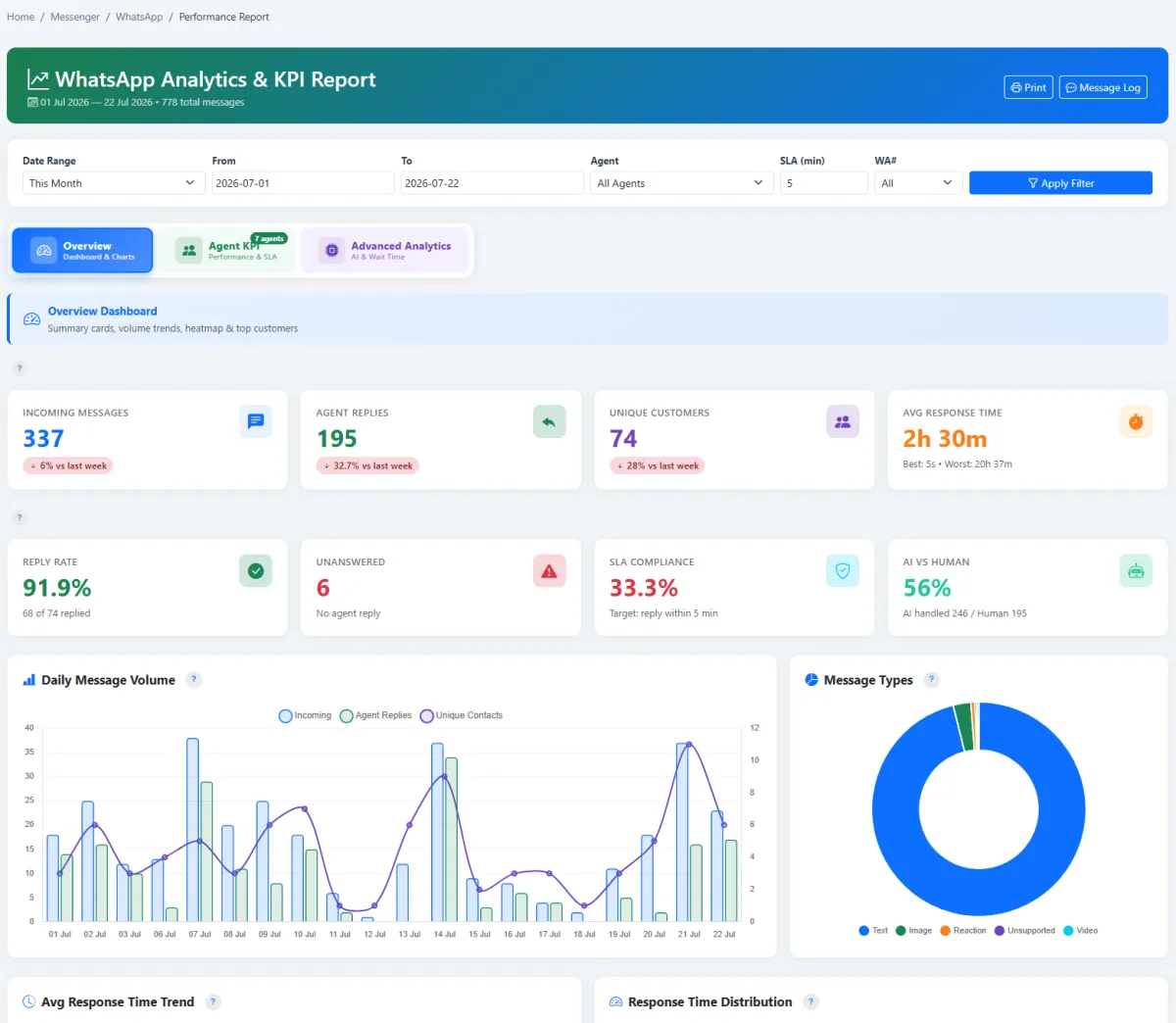
See how fast your team really replies.
Turn conversations into service KPIs. Track response time, reply rate, unanswered messages and SLA compliance by agent or WhatsApp number, and see how much AI handles compared with your team.
- Average response time and reply rate
- SLA compliance against your own target
- AI-versus-human handling
- Export message logs to CSV
How it works
From WhatsApp number to working channel.
- 01 · Connect
Set up your WABA account
We help you connect your business number to the WhatsApp Business API through iSMS.
- 02 · Configure
Set AI, hours and commands
Decide when AI replies, how customers reach an agent and who gets notified.
- 03 · Templates
Prepare approved templates
Business-initiated messages use templates approved for WhatsApp, such as reminders and promotions.
- 04 · Engage
Chat, remind and promote
Answer enquiries in the shared inbox and send template messages to your customer groups.
- 05 · Measure
Review response KPIs
Use response time, reply rate and SLA reports to keep improving service.
- 06 · Grow
Link it to the rest of iCRM
Conversations stay on the customer record next to quotations, service cases and renewals.
WhatsApp Business API rates
Pay only for the messages you use.
Malaysia rates processed through iSMS. These apply in addition to the iCRM Business plan and AI credits.
Promotions, campaigns, offers and re-engagement.
Appointment reminders, receipts, order and service updates.
One-time passwords and login verification.
Replies within the 24-hour window after a customer messages you.
AI replies use AI credits: RM 10 for 2,000 replies. See full pricing and cost examples →
What is the WhatsApp Business API? +
It is the business version of WhatsApp designed for companies. Unlike the WhatsApp Business app on one phone, it lets a team share one number, connect it to software such as iCRM, automate replies and send approved template messages.
Can we keep using our existing number? +
Usually yes, but a number can only be registered on one WhatsApp service at a time. We will check your number during setup and explain the options.
What is the 24-hour service window? +
When a customer messages you, a 24-hour window opens in which AI and agents can reply as needed. Each new customer message resets the clock. Outside the window, businesses contact customers using approved template messages.
How much does it cost? +
The WhatsApp Business API is included in the iCRM Business plan. Messages are billed by usage: from RM 0.10 per service or authentication message to RM 0.50 per marketing message, plus AI credits if you use the AI assistant. See pricing.
WhatsApp Business API
Ready to run WhatsApp like a team, not a phone?
Tell us who you want to reach and what you want to send. We'll show you how it works in iCRM.