Operational event design
Create classes, programmes, booths and other attendance-based events with participant and payment workflows.
Design long-running and recurring events, generate child dates, register attendance terminals and participants by QR, manage rosters and attendance, settle vendor PIC commission, trace statements and payments, and control companion-app access.
Design long-running and recurring events, generate child dates, register attendance terminals and participants by QR, manage rosters and attendance, settle vendor PIC commission, trace statements and payments, and control companion-app access.
Create classes, programmes, booths and other attendance-based events with participant and payment workflows.
Keep operational registration events distinct from the corporate calendar used for holidays and employee leave.
Use one parent event to hold the programme identity, overall period and recurring structure.
Choose the class-start date as the first actual session in the recurring programme.
Set event-from and event-to dates across a long programme period, including programmes that run for years.
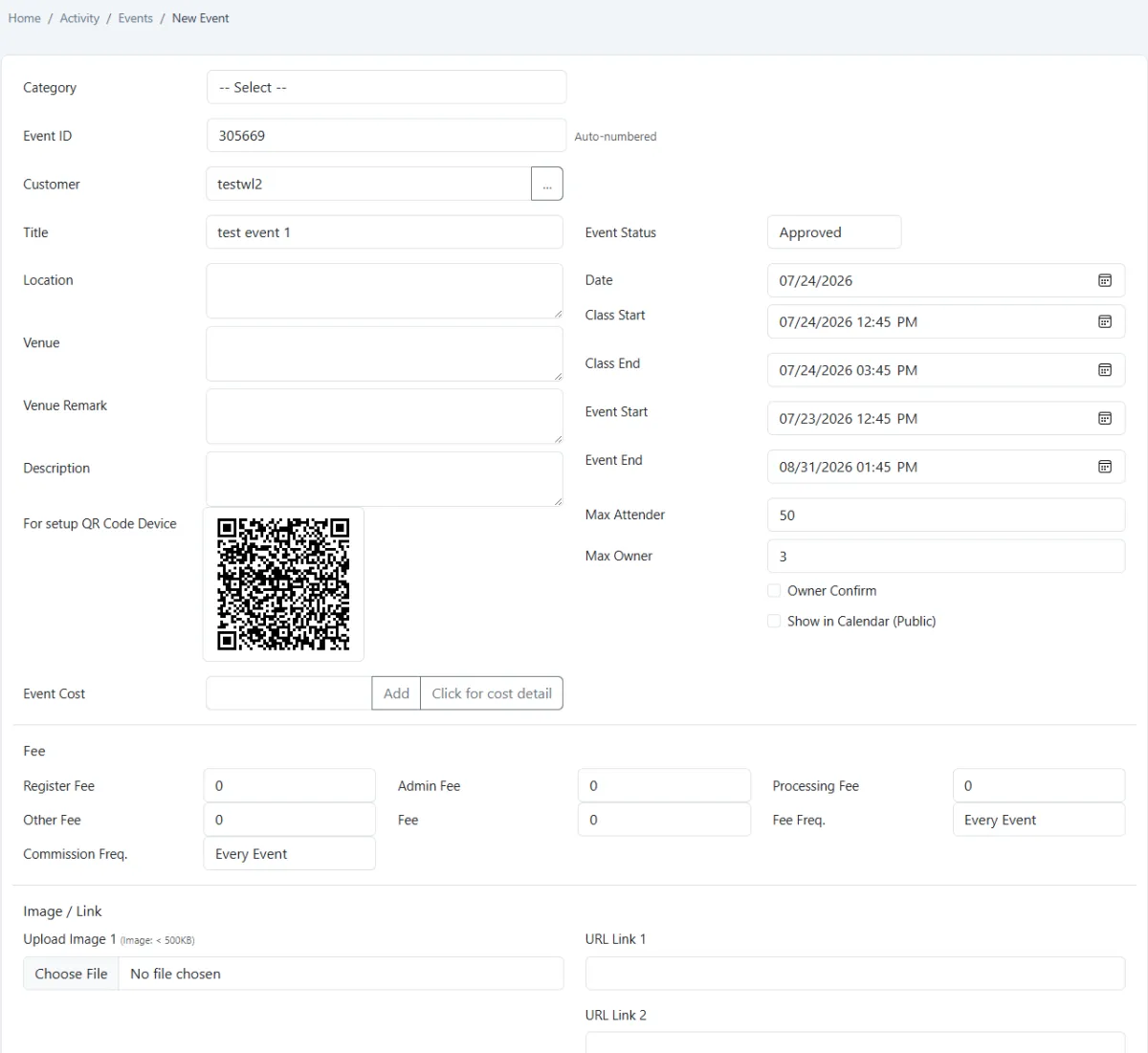
Record category, customer, title, location, venue, remarks, description and supporting links or images.
Set maximum attendees, maximum owners, owner confirmation and optional public-calendar visibility.
Maintain registration, administration, processing and other fees together with event and commission frequency.
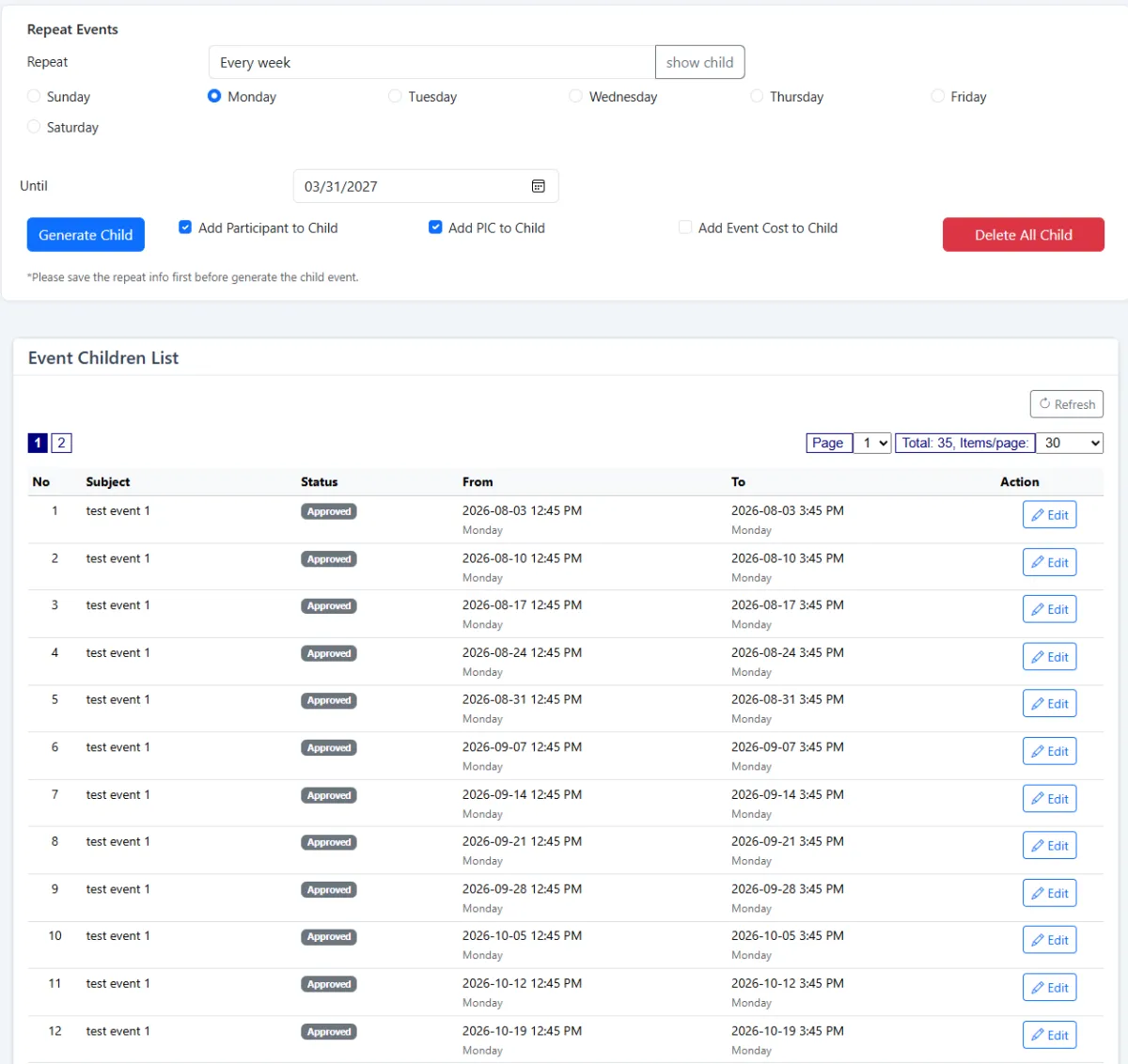
Generate repeated child events daily, weekly, monthly or yearly.
Create a dated child event for every recurrence occurrence, such as every Monday.
Copy the parent participant roster into generated child events where required.
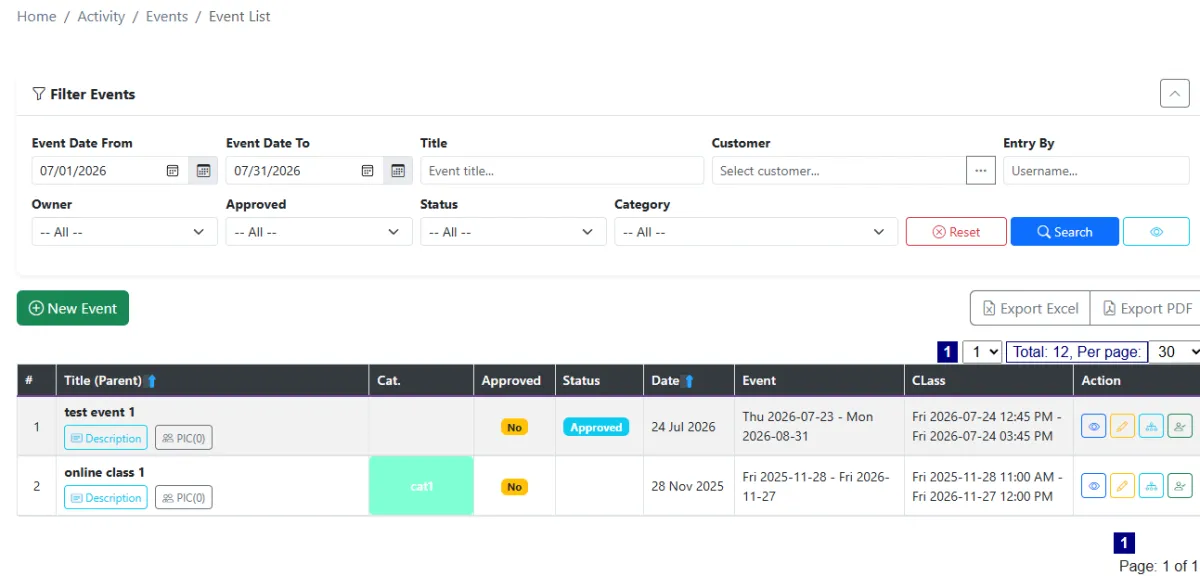
Keep the primary event list concise by showing top-level parent events.
Edit one child date to add or remove a participant without changing every event in the series.
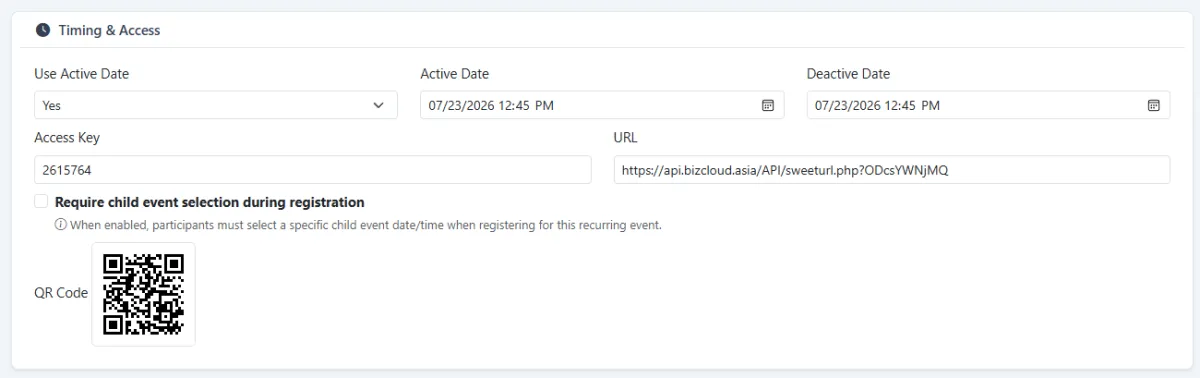
Use the event’s setup QR to register an attendance terminal to the correct event.
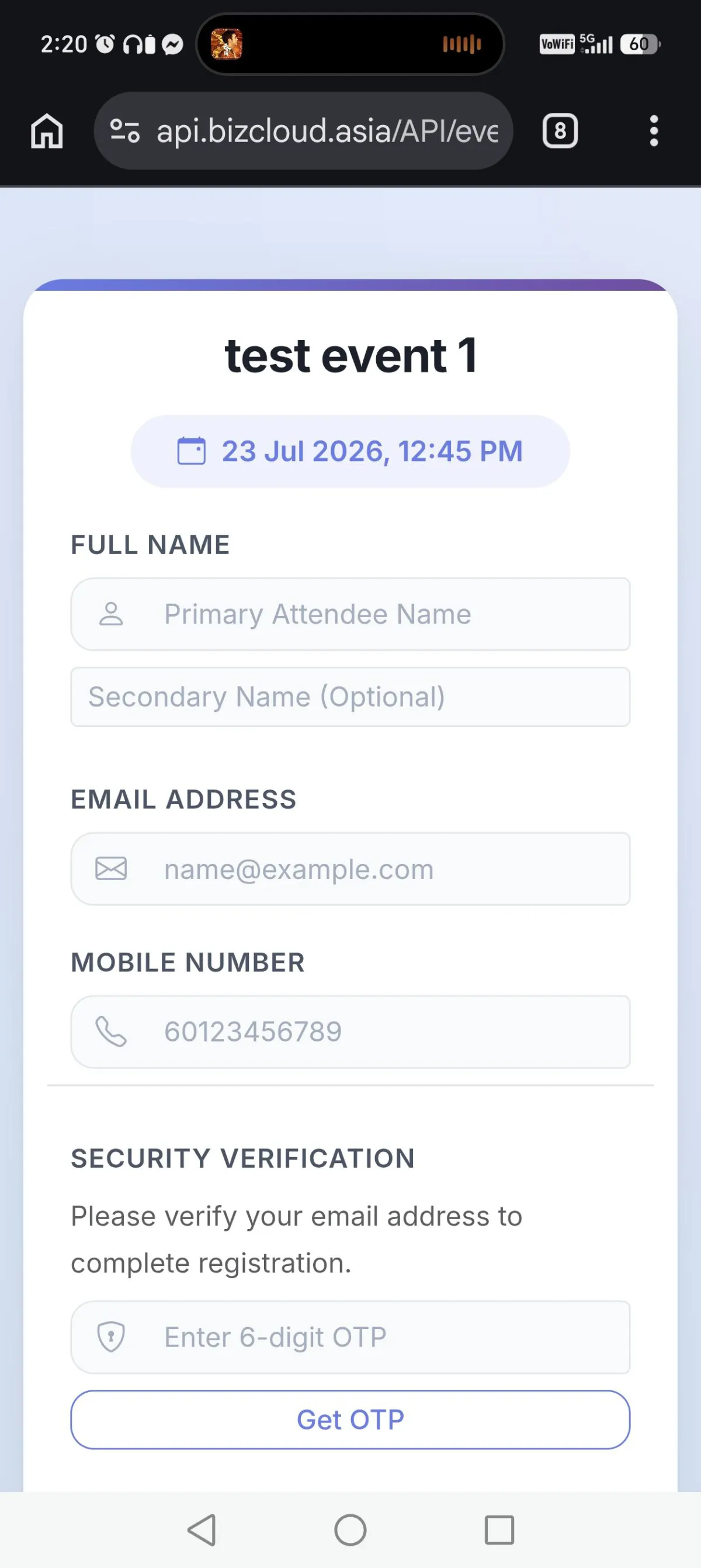
Let a participant scan a registration QR and complete a mobile-friendly event form.
Guide the registrant to choose the relevant child date when joining a recurring event.
Use email verification during QR registration when the registration flow requires it.
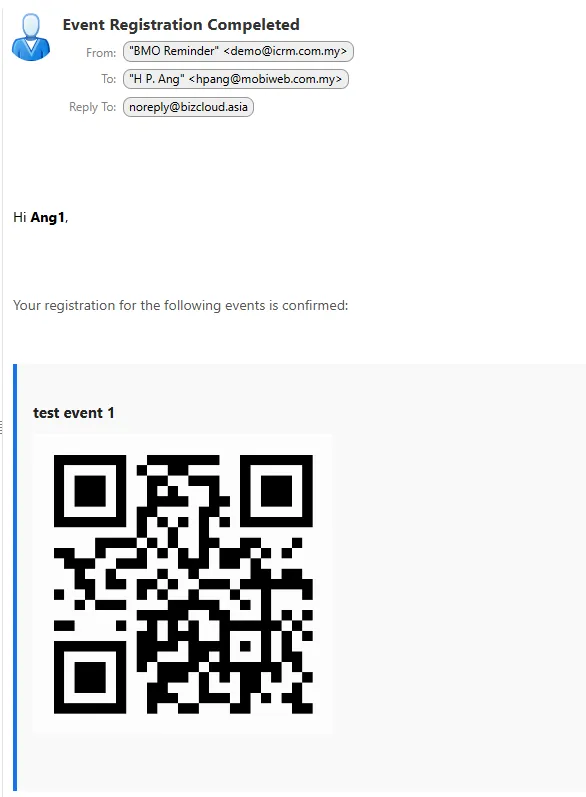
Send confirmation to the participant after successful event registration.
Give each registered participant a personal QR code by email for attendance.
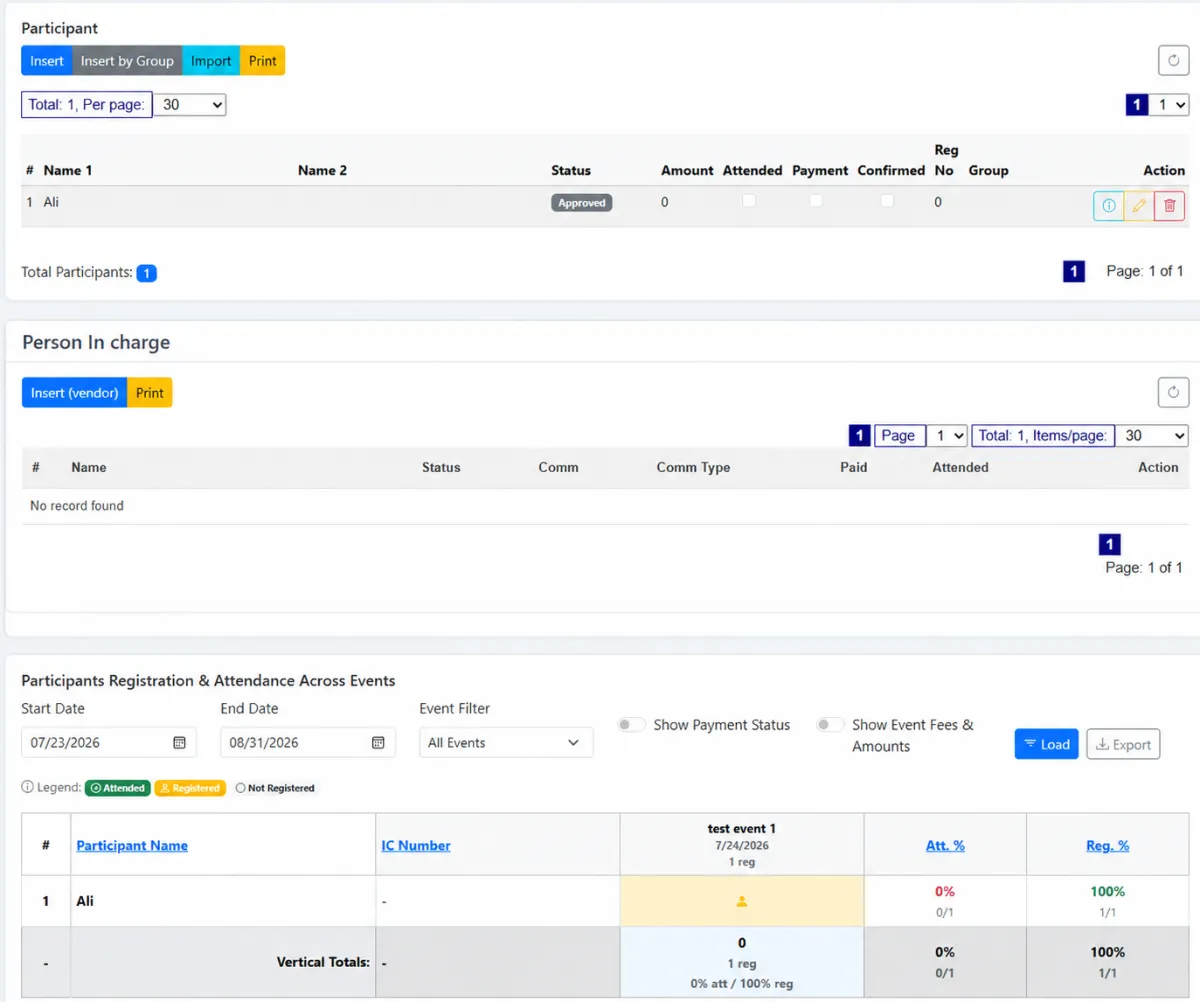
Insert people from the CRM contact list, import a participant list or register someone who is not yet a contact.
Review participant registration and attendance across events, sessions or booths.
Let a registered QR terminal scan the participant’s personal QR code for attendance.
Tick participants as attended from the event attendance-marking screen.
Scan the event QR on an Android device, load the roster and mark attendees one by one.
Select event PICs from the vendor list so payees are maintained as controlled supplier records.
Mark whether a person in charge attended the event before commission settlement.
Calculate PIC commission from the person-in-charge assignment and associated participant payment.
Filter parent and child events, attendance and payment status, then prepare PIC commission for payment.
Record the voucher, amount and paid state for each PIC commission entry.
Review event charges, invoice, receipt or cash-sale references and outstanding balances by participant.
Filter by event dates, event, participant and status, then print one statement or all statements.
Issue participant statements of account from the event accounting workflow.
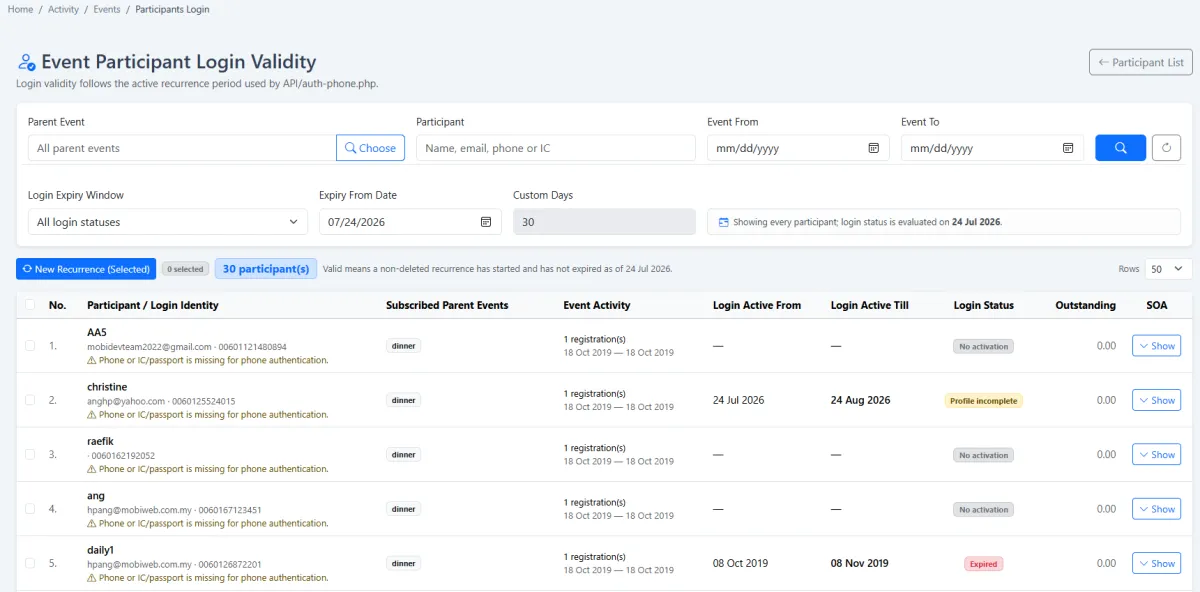
Tie companion-portal login validity to the participant’s recurring event period.
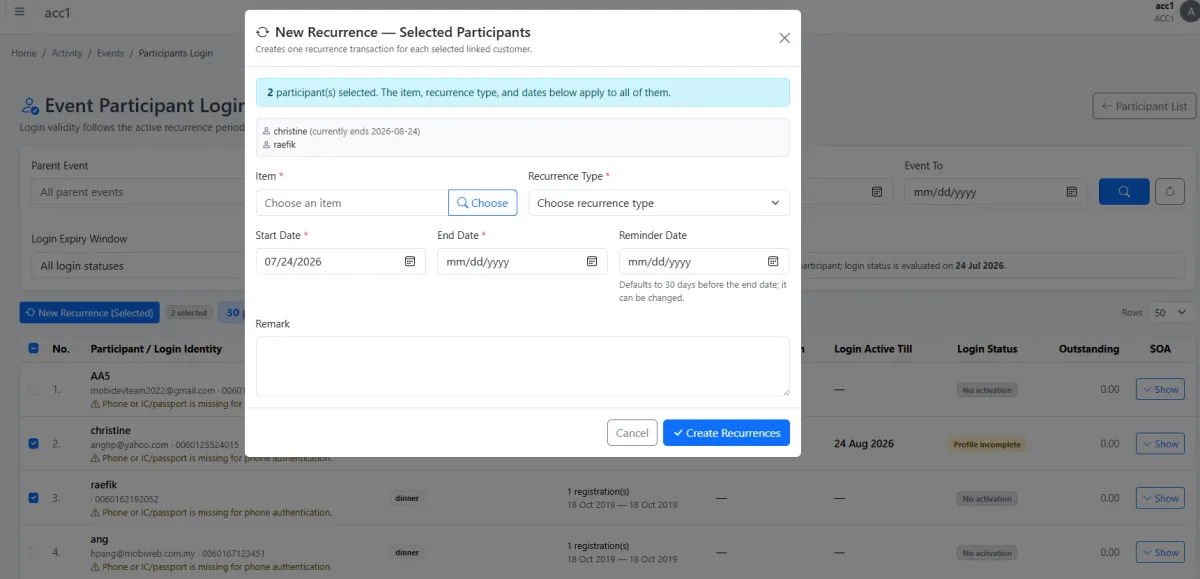
Select multiple participant logins and extend their access when the programme continues.
Automatically mark a participant paid when payment is completed through an Adaptis-enabled companion app.
Let participants sign in to the companion web app to view or download their receipt.
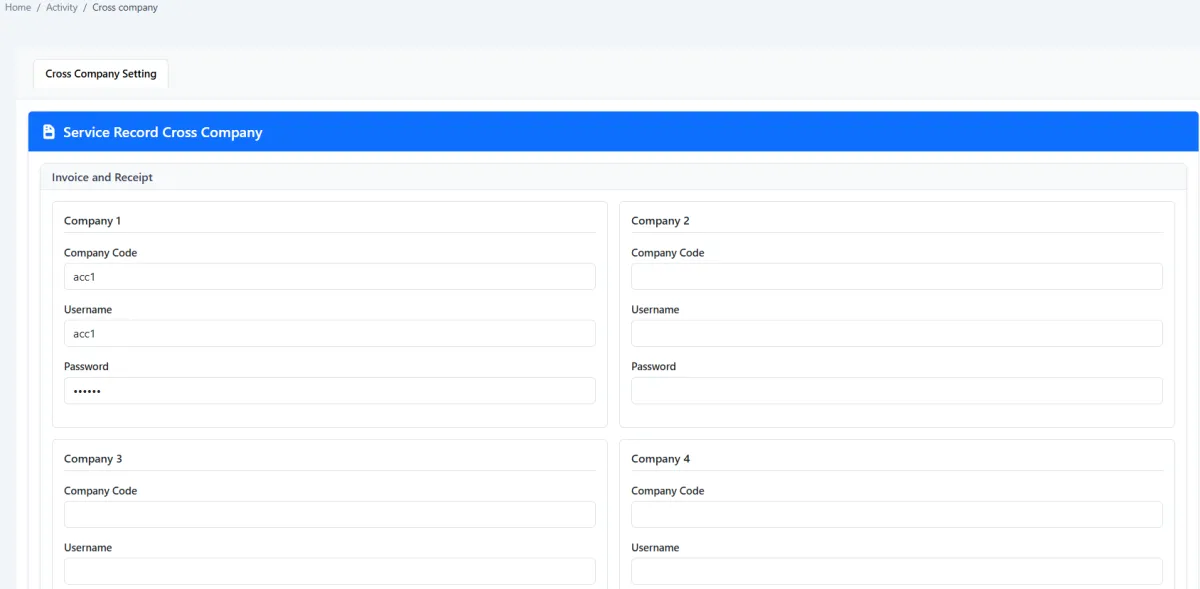
Configure another company code as the source for cash-sale, receipt or invoice numbers.
Let administrators connect the correct cash sale, receipt or invoice to a participant record.
iCRM models a programme as a parent event with generated child dates, then connects registration, rosters, participant and PIC attendance, commission, statements, receipts and companion access to that structure.
Operational events, QR registration, attendance, participants, vendor PIC commission, statements, payment references and access validity.
The class-focused journey with Tutor Companion, interactive learning, student access and assessments.
Explore Tuition & Classes → SEPARATE CALENDARCompany holidays, employee leave and internal corporate events without participant-registration operations.
Explore Corporate Workspace →Create the parent event with its first class or session time and a longer event-from and event-to period. The same record carries the category, customer, venue, capacity, owner controls, public-calendar option, costs, fees and setup QR for the attendance terminal.
Repeat the parent event daily, weekly, monthly or yearly. Each generated date becomes a child event and can inherit the participant list. The main event list stays clean by showing parents, while one child date can receive an extra participant without changing the whole series.
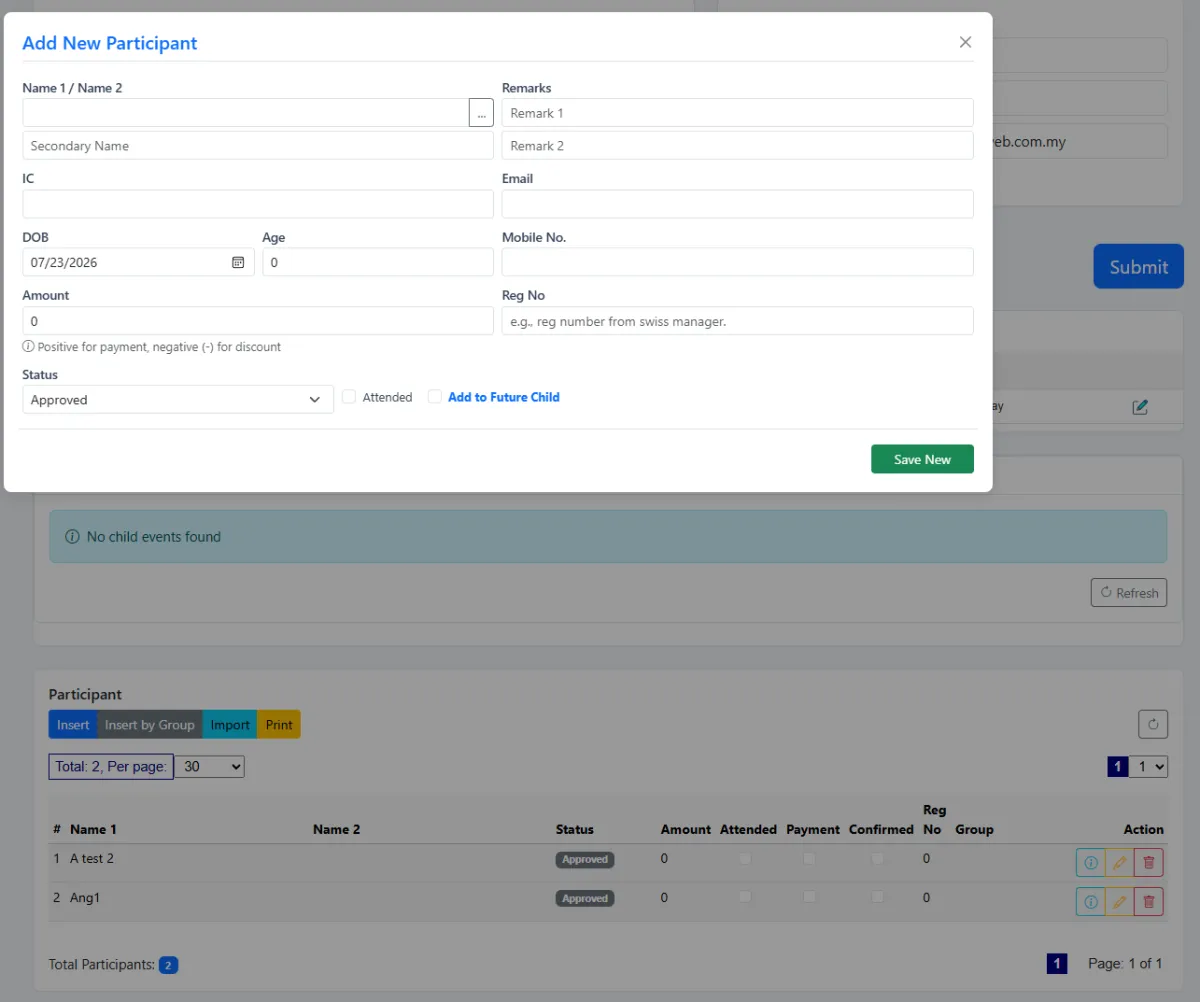
A participant can scan the public QR, choose the relevant child event and complete the mobile registration form. Email verification can protect the journey; successful registration triggers confirmation and a personal attendance QR. Administrators can also select CRM contacts, import a list or insert a participant directly.
Register a QR terminal to the correct event, then scan each participant’s emailed QR code. When a staffed mobile station is more practical, scan the event on Android, load the roster and tick attendees one by one. Administrators can also mark participant and PIC attendance manually.
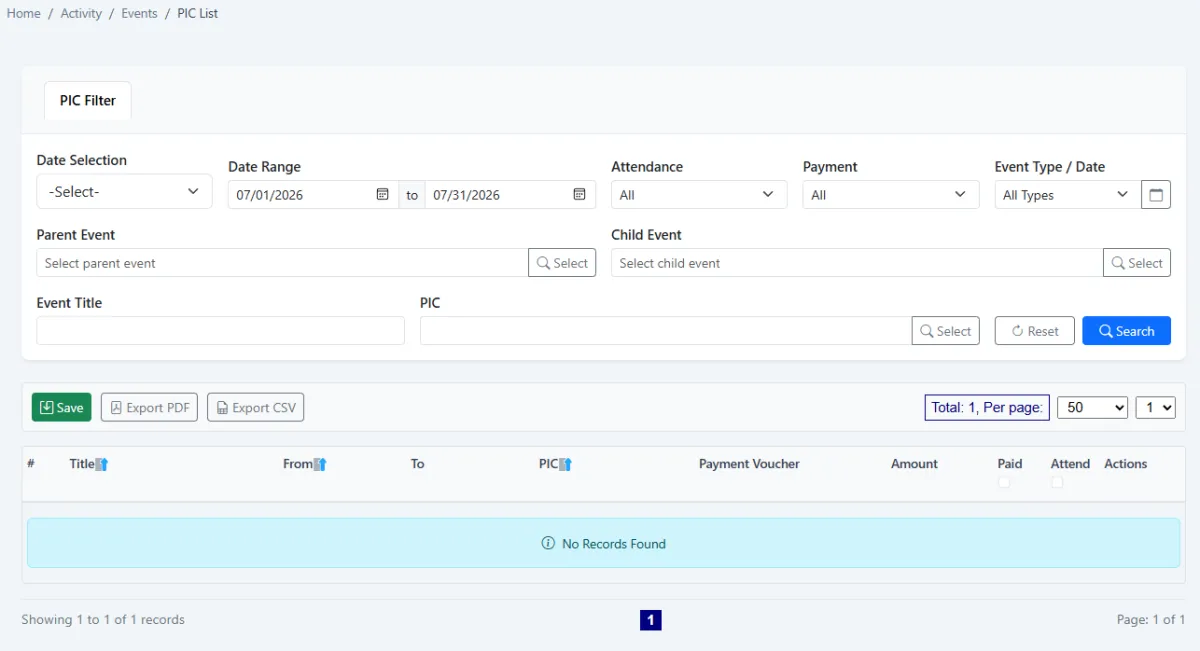
Event PICs are selected from the vendor list. Their attendance can be confirmed for commission purposes, and the PIC list brings event, attendance and payment information together so commission can be calculated, approved and marked paid with a voucher reference.
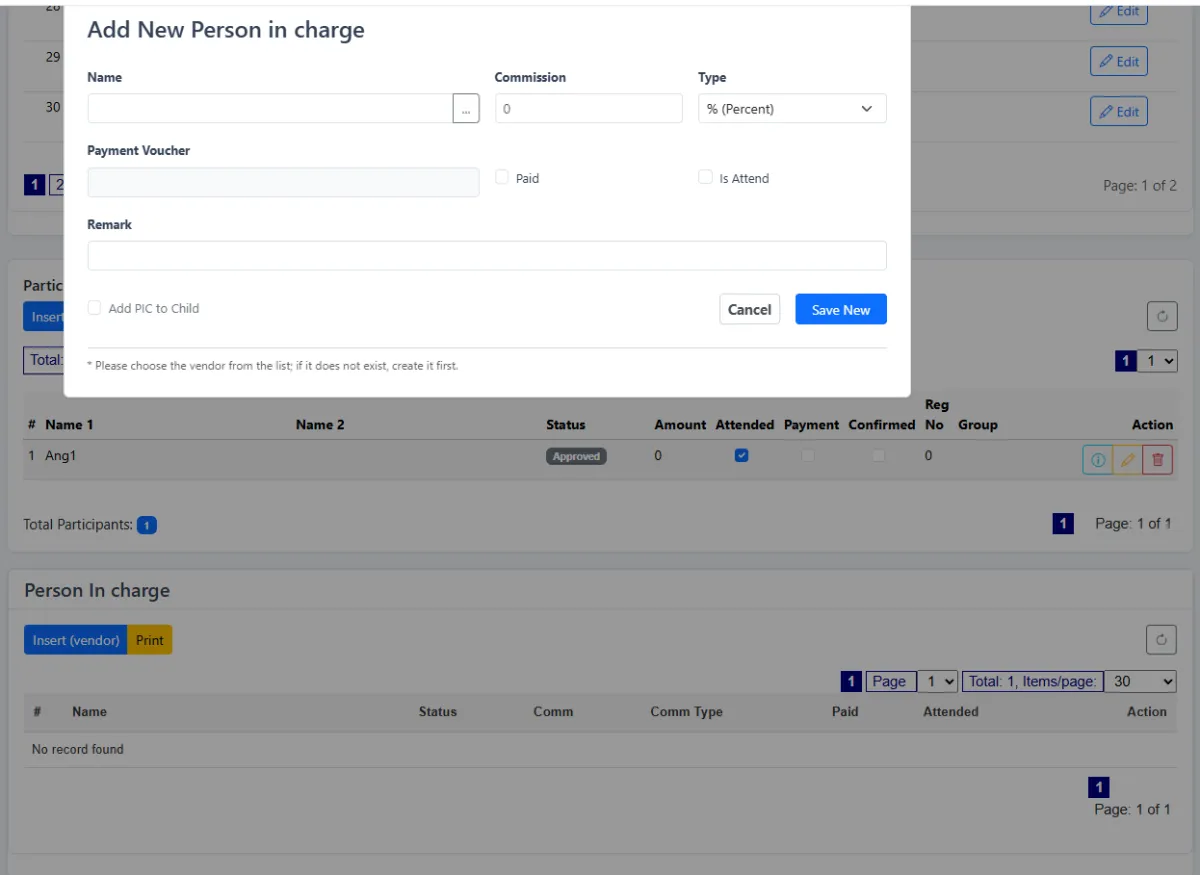
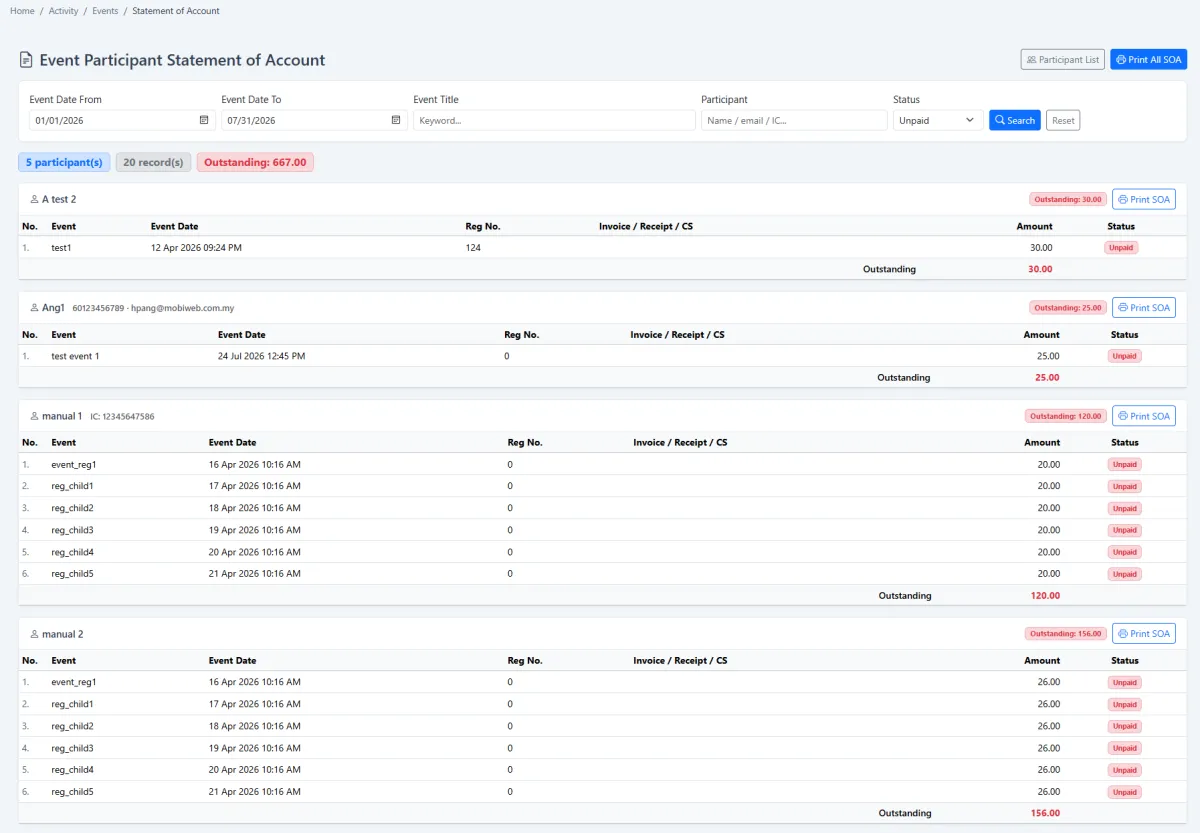
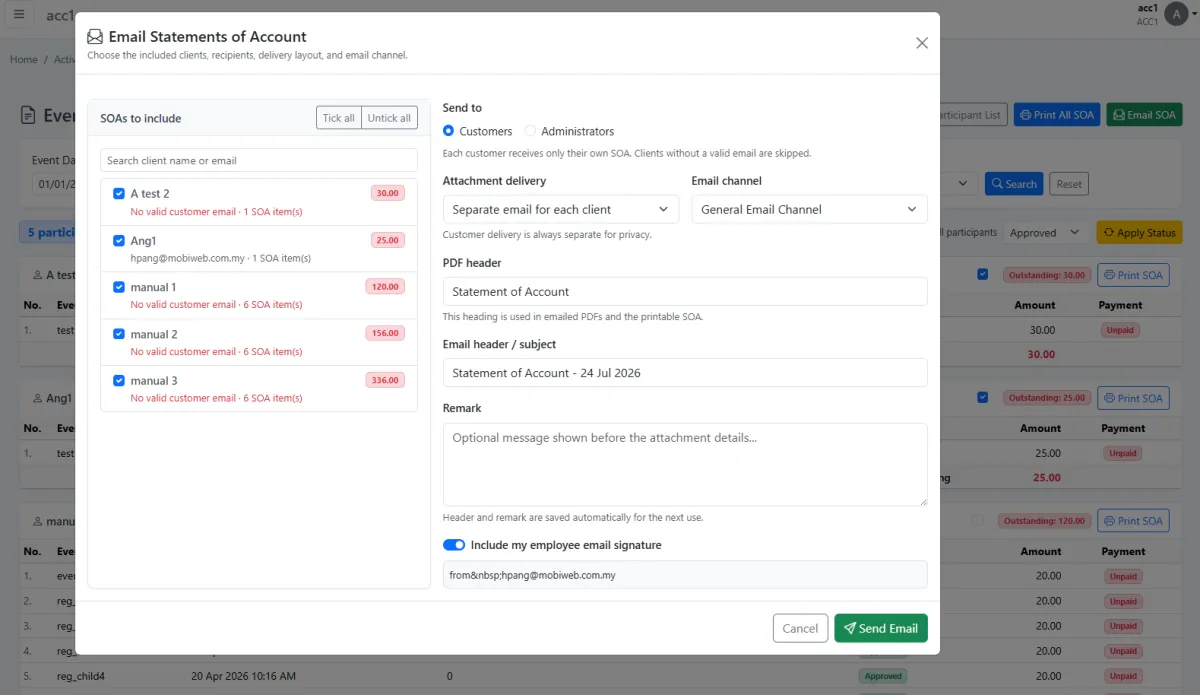
The statement of account groups event charges and outstanding balances by participant. Statements can be searched, printed and sent. Administrators can connect receipts, invoices or cash sales to participant records, including references retrieved from another configured company code.
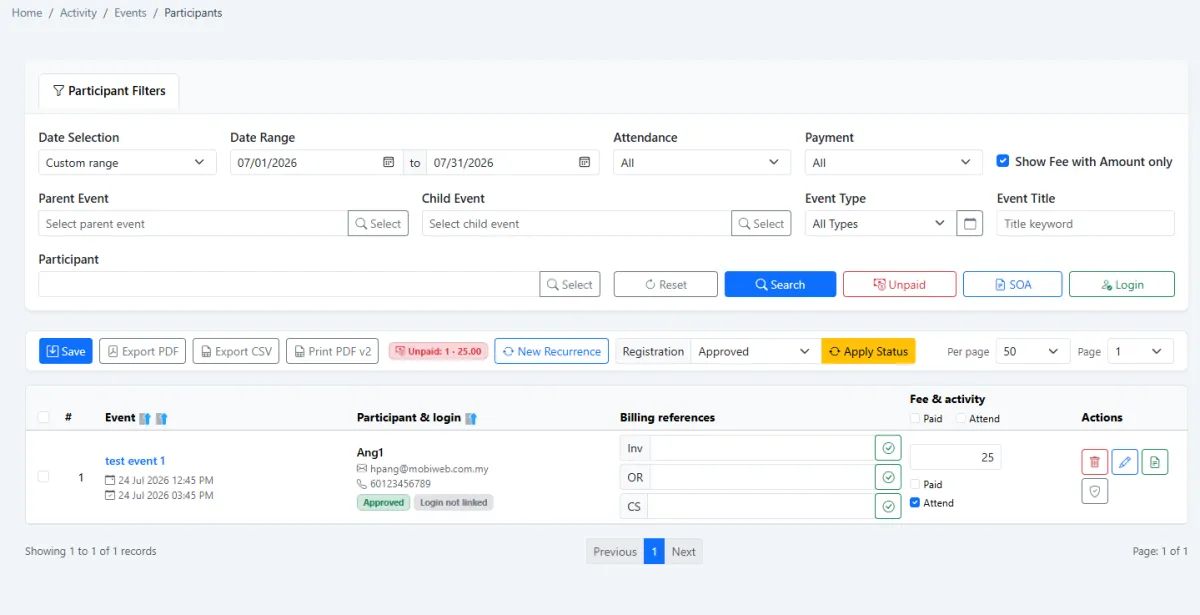
Participant login validity follows the recurring event period and can be extended in bulk when the programme continues. Payments made through an Adaptis-enabled companion app update the paid state, while signed-in participants can view or download their receipt.
Use the parent for the programme, children for each date and the participant record as the connection between attendance, payment and access.
Record the programme, first session, full period, venue, capacity, fees and owner controls.
Choose the recurrence pattern and create every daily, weekly, monthly or yearly occurrence.
Register by public QR, select contacts, import a list or add non-contacts directly.
Edit the relevant child event when a participant attends only that occurrence.
Register the terminal and choose QR scan, Android roster or manual marking.
Select vendor PICs, mark their attendance and calculate the commission due.
Review charges, outstanding amounts and linked receipt, invoice or cash-sale references.
Print or issue participant statements and follow up unpaid balances.
Record voucher, commission amount and paid status from the PIC list.
Extend recurrence-linked logins and preserve companion-app receipt self-service.
Explore how the screens and functions in Events, Attendance & Participants support setup, daily operations and continuous improvement.
Create classes, programmes, booths and other attendance-based events with participant and payment workflows.
Keep operational registration events distinct from the corporate calendar used for holidays and employee leave.
Use one parent event to hold the programme identity, overall period and recurring structure.
Choose the class-start date as the first actual session in the recurring programme.
Set event-from and event-to dates across a long programme period, including programmes that run for years.
Record category, customer, title, location, venue, remarks, description and supporting links or images.
Set maximum attendees, maximum owners, owner confirmation and optional public-calendar visibility.
Maintain registration, administration, processing and other fees together with event and commission frequency.
Generate repeated child events daily, weekly, monthly or yearly.
Create a dated child event for every recurrence occurrence, such as every Monday.
Copy the parent participant roster into generated child events where required.
Keep the primary event list concise by showing top-level parent events.
Edit one child date to add or remove a participant without changing every event in the series.
Use the event’s setup QR to register an attendance terminal to the correct event.
Let a participant scan a registration QR and complete a mobile-friendly event form.
Guide the registrant to choose the relevant child date when joining a recurring event.
Use email verification during QR registration when the registration flow requires it.
Send confirmation to the participant after successful event registration.
Give each registered participant a personal QR code by email for attendance.
Insert people from the CRM contact list, import a participant list or register someone who is not yet a contact.
Review participant registration and attendance across events, sessions or booths.
Let a registered QR terminal scan the participant’s personal QR code for attendance.
Tick participants as attended from the event attendance-marking screen.
Scan the event QR on an Android device, load the roster and mark attendees one by one.
Select event PICs from the vendor list so payees are maintained as controlled supplier records.
Mark whether a person in charge attended the event before commission settlement.
Calculate PIC commission from the person-in-charge assignment and associated participant payment.
Filter parent and child events, attendance and payment status, then prepare PIC commission for payment.
Record the voucher, amount and paid state for each PIC commission entry.
Review event charges, invoice, receipt or cash-sale references and outstanding balances by participant.
Filter by event dates, event, participant and status, then print one statement or all statements.
Issue participant statements of account from the event accounting workflow.
Tie companion-portal login validity to the participant’s recurring event period.
Select multiple participant logins and extend their access when the programme continues.
Automatically mark a participant paid when payment is completed through an Adaptis-enabled companion app.
Let participants sign in to the companion web app to view or download their receipt.
Configure another company code as the source for cash-sale, receipt or invoice numbers.
Let administrators connect the correct cash sale, receipt or invoice to a participant record.
Create the parent event, programme period, fees and first session.
Create recurring child dates and carry the roster into the series.
Add participants by QR, contact selection, import or direct entry.
Capture participant and PIC attendance by QR, Android or manual marking.
Trace statements, receipts, companion payments and vendor PIC commission.
Extend recurrence-linked logins and preserve participant accounting evidence.
Tell us how your team works today. We’ll demonstrate the modules that matter most.
Book your personalised demo →