Central vendor list
Maintain supplier organisations in one purchasing directory with account code, company, contact and activity information.
Maintain a searchable vendor database, approval and termination controls, Malaysian tax and MSIC details, supplier documents, and the many-to-many relationship between vendors and the items they can supply.
Maintain a searchable vendor database, approval and termination controls, Malaysian tax and MSIC details, supplier documents, and the many-to-many relationship between vendors and the items they can supply.
Maintain supplier organisations in one purchasing directory with account code, company, contact and activity information.
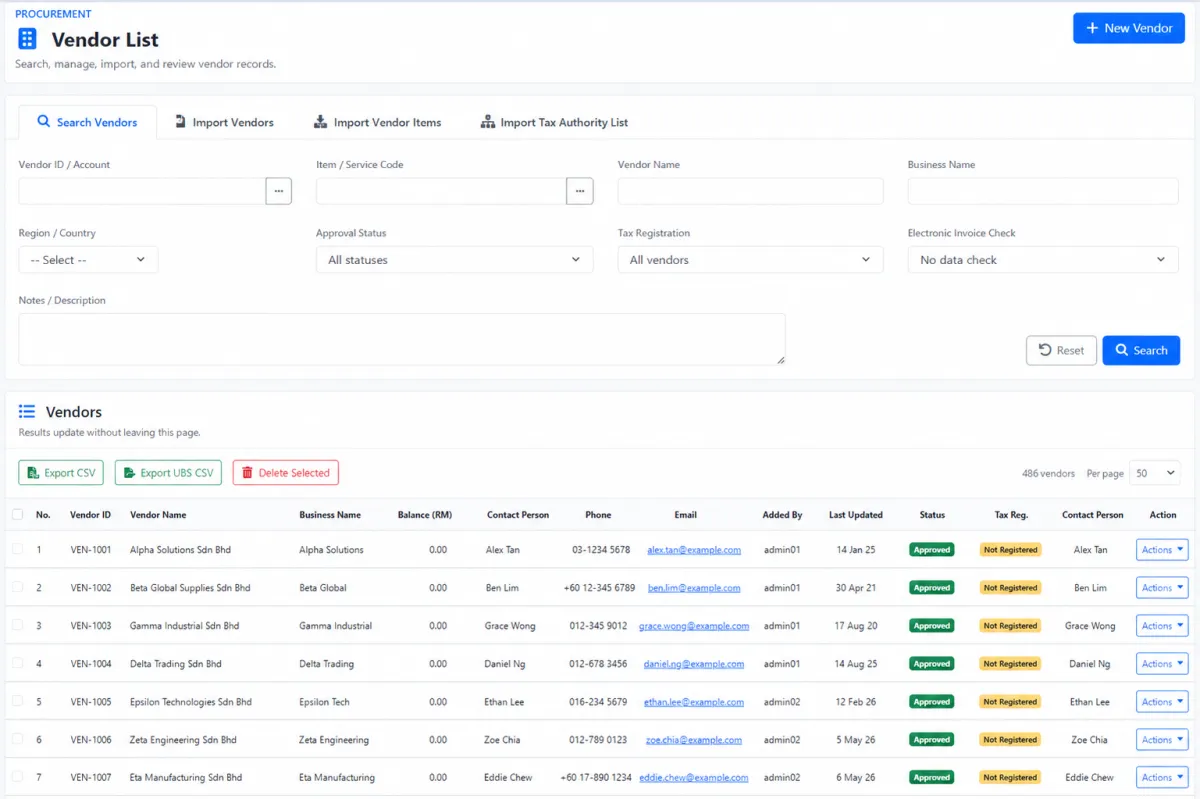
Find vendors by account code, vendor name, company name, country or description.
Enter an item code to identify vendors connected to that item.
Separate approved, pending or other supplier states during sourcing and review.
Filter by Tax ID availability and e-Invoice data-check status to find incomplete supplier records.
Mark the supplier approved and preserve the approval date and reason.
Separate new suppliers requiring review from the approved vendor register.
See request date, country, supplied-item count, requesting team and priority before review.
Preserve who approved each supplier and keep the final approved status visible.
Record who terminated the vendor relationship, the termination date and reason.
Review account ID, vendor and business name, balance, contact person, phone, email, added-by user and last update.
Create the general, accounting, address and supplied-item profile from one vendor workflow.
Maintain the primary supplier representative and link useful contact information.
Record phone, email, WhatsApp, Skype, Facebook, WeChat and web address where applicable.
Store the supplier’s Malaysian business registration information.
Maintain the vendor TIN needed for e-Invoice and accounting processes.
Record additional supplier tax identifiers when they apply.
Retain the date on which GST-related status was verified.
Assign the vendor’s Malaysian Standard Industrial Classification from the maintained reference list.
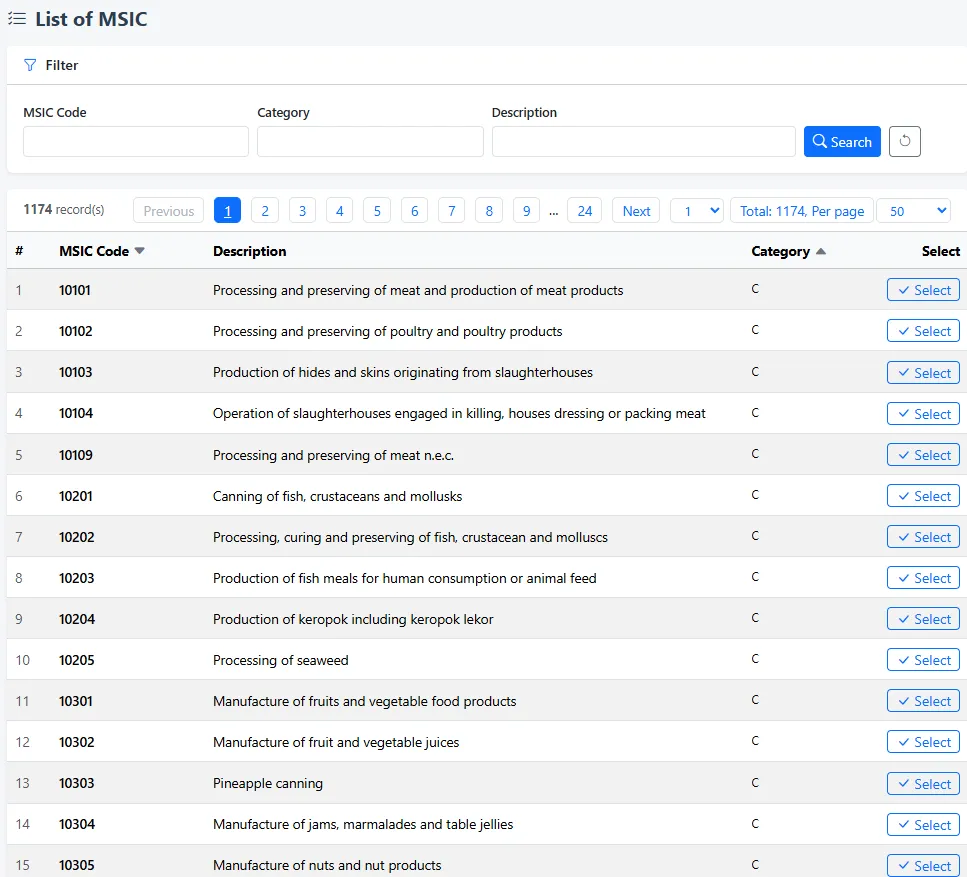
Search more than one thousand MSIC entries by code, category or description and select the correct activity.
Upload and retain supplier contracts, certificates, catalogues, price lists and other supporting documents.
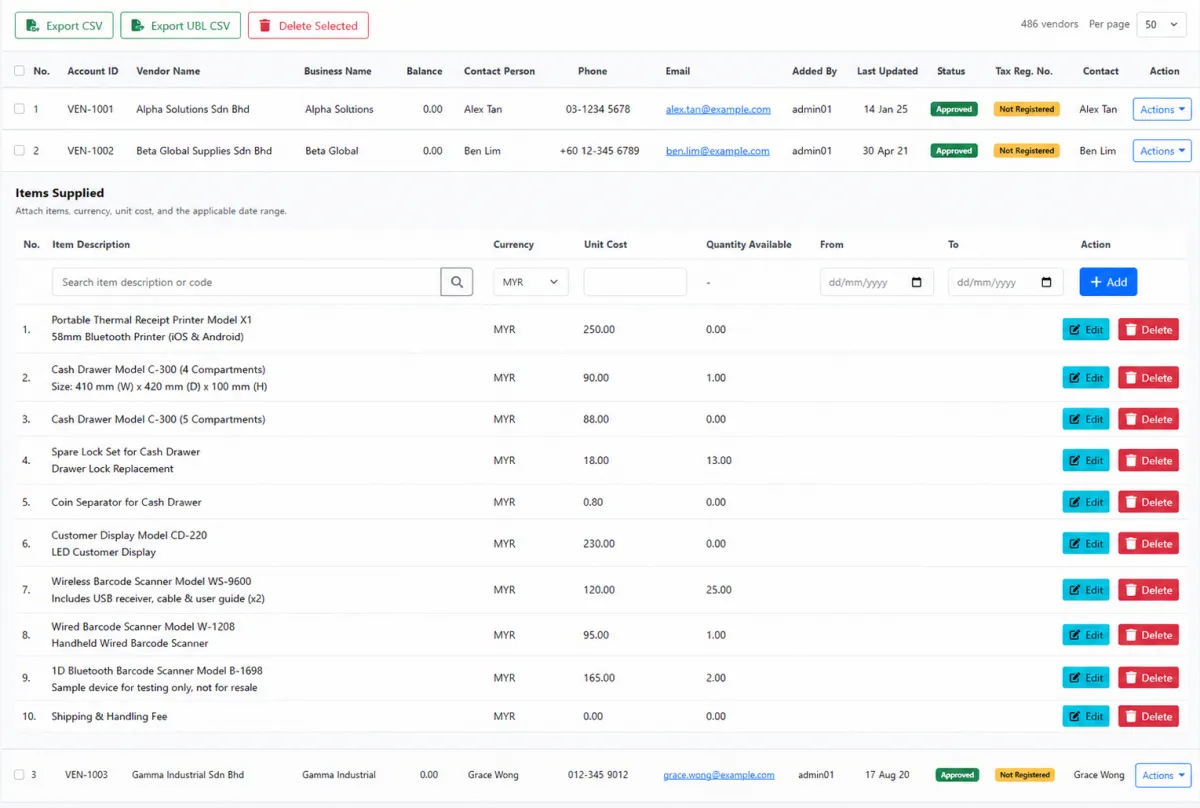
Expand a vendor record to see every item supplied by that organisation.
Review item code, description, currency, vendor cost, on-hand quantity and applicable date range.
Use from and to dates when a vendor cost or supply relationship applies only for a period.
Maintain the supplier’s item relationships directly from the vendor list.
Attach several possible suppliers to the same inventory item.
Maintain a complete assortment of supplied items under one vendor.
See each linked vendor’s currency, cost, effective dates and approval status against the same item.
Connect an established vendor or create a new supplier from the item view.
Start a purchase order for a selected item-and-vendor relationship.
Hide vendor and cost relationships from unauthorised item users through menu permission.
Import supplier master data when onboarding or migrating a larger directory.
Import item-supplier relationships separately from general vendor details.
Import the relevant tax-authority supplier list from the vendor workspace.
Export the vendor directory for analysis or connected accounting processes.
Surface missing Tax ID information directly in the list so teams know what needs attention.
Use approved vendor-item relationships as the sourcing foundation for purchase orders and item management.
iCRM connects supplier identity, approval, tax classification, evidence files and item relationships so purchasing teams can move from a vendor search to an informed sourcing decision without rebuilding the context.
The vendor list combines search, import, export and record maintenance. Filter by vendor or item identity, region, approval status, tax registration and electronic-invoice data check, then review the contact, balance, record owner, last update and tax completeness directly in the results.
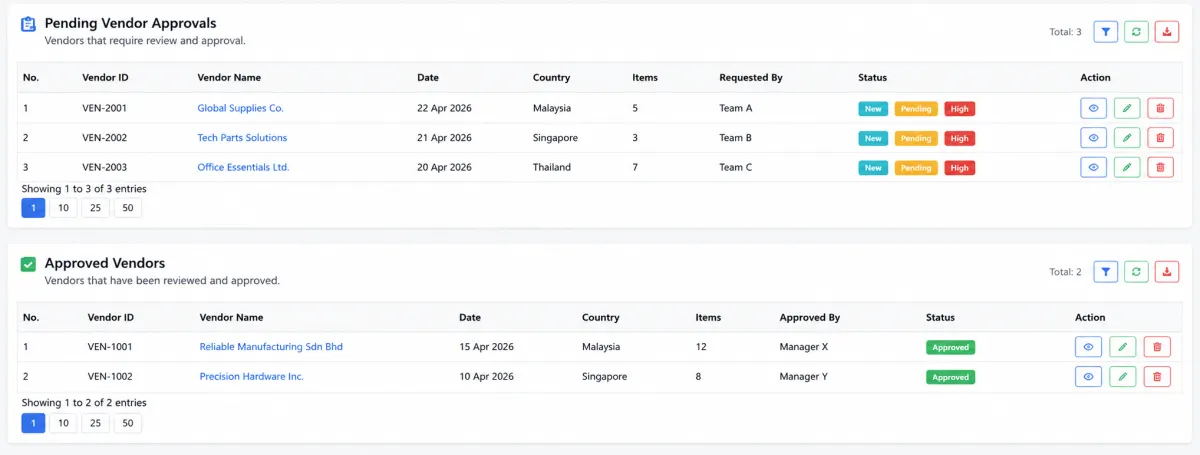
The approval workspace gives pending and approved vendors their own lists. Review the request date, country, number of items, requesting team and priority before deciding, then retain the approval owner and final status as visible governance evidence.
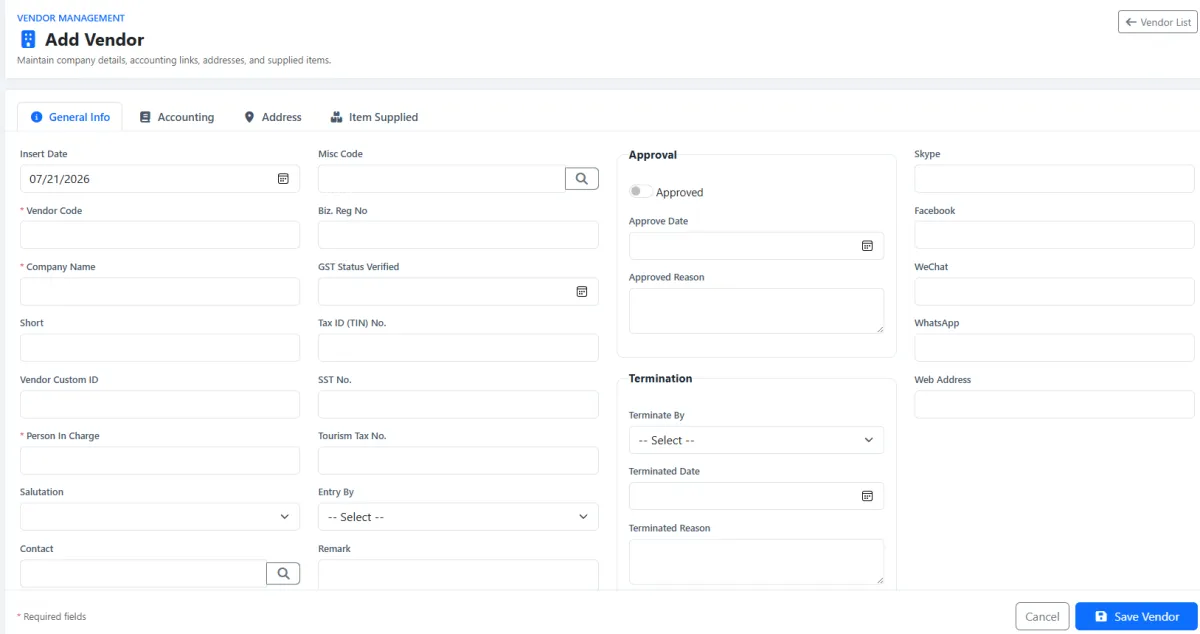
The profile stores identity, contact and accounting information together with TIN, business registration, SST, tourism tax and GST-verification details. The searchable MSIC library helps assign the correct business activity, while approval and termination dates preserve the relationship history.
Expand the vendor record to see every linked item. Each relationship can carry currency, cost, on-hand reference and an effective date range, making the list useful for both current purchasing and the maintenance of dated supplier terms.
The item list reverses the relationship: one stock item can show multiple vendors with their currency, cost, dates and approval. Buyers can attach an existing or new supplier and begin a purchase order for the chosen relationship.
Use the vendor file area for the records purchasing, finance and operations may need to verify later. Centralising the evidence avoids contracts, certificates and price information being separated from the supplier profile.
Approved and complete vendor data supports purchasing, inventory, events, accounting and access control.
See one vendor’s assortment or compare many suppliers for one item.
Start the buying workflow from the selected item-and-vendor relationship.
Select controlled vendor records as event PICs for commission settlement.
Use TIN, MSIC and supporting evidence in e-Invoice and finance processes.
Preserve who approved the supplier, when and for what reason.
Restrict item-vendor and cost visibility for users who do not need it.
Complete identity and compliance first, then build the item relationships purchasing will rely on.
Enter the company, account code, PIC and communication details.
Record business registration, TIN and other applicable tax identifiers.
Search the maintained code library and assign the correct business activity.
Attach contracts, certificates, catalogues, price lists and tax documents.
Record the approval decision, date and reason for later review.
Add item, currency, cost and effective date range to the vendor.
Open an item to review other approved vendors and their costs.
Begin the purchase order and update files, costs or supplier status as needed.
Explore how the screens and functions in Vendor & Supplier Management support setup, daily operations and continuous improvement.
Maintain supplier organisations in one purchasing directory with account code, company, contact and activity information.
Find vendors by account code, vendor name, company name, country or description.
Enter an item code to identify vendors connected to that item.
Separate approved, pending or other supplier states during sourcing and review.
Filter by Tax ID availability and e-Invoice data-check status to find incomplete supplier records.
Mark the supplier approved and preserve the approval date and reason.
Separate new suppliers requiring review from the approved vendor register.
See request date, country, supplied-item count, requesting team and priority before review.
Preserve who approved each supplier and keep the final approved status visible.
Record who terminated the vendor relationship, the termination date and reason.
Review account ID, vendor and business name, balance, contact person, phone, email, added-by user and last update.
Create the general, accounting, address and supplied-item profile from one vendor workflow.
Maintain the primary supplier representative and link useful contact information.
Record phone, email, WhatsApp, Skype, Facebook, WeChat and web address where applicable.
Store the supplier’s Malaysian business registration information.
Maintain the vendor TIN needed for e-Invoice and accounting processes.
Record additional supplier tax identifiers when they apply.
Retain the date on which GST-related status was verified.
Assign the vendor’s Malaysian Standard Industrial Classification from the maintained reference list.
Search more than one thousand MSIC entries by code, category or description and select the correct activity.
Upload and retain supplier contracts, certificates, catalogues, price lists and other supporting documents.
Expand a vendor record to see every item supplied by that organisation.
Review item code, description, currency, vendor cost, on-hand quantity and applicable date range.
Use from and to dates when a vendor cost or supply relationship applies only for a period.
Maintain the supplier’s item relationships directly from the vendor list.
Attach several possible suppliers to the same inventory item.
Maintain a complete assortment of supplied items under one vendor.
See each linked vendor’s currency, cost, effective dates and approval status against the same item.
Connect an established vendor or create a new supplier from the item view.
Start a purchase order for a selected item-and-vendor relationship.
Hide vendor and cost relationships from unauthorised item users through menu permission.
Import supplier master data when onboarding or migrating a larger directory.
Import item-supplier relationships separately from general vendor details.
Import the relevant tax-authority supplier list from the vendor workspace.
Export the vendor directory for analysis or connected accounting processes.
Surface missing Tax ID information directly in the list so teams know what needs attention.
Use approved vendor-item relationships as the sourcing foundation for purchase orders and item management.
Create the supplier profile, contacts, address and accounting information.
Add TIN, tax details, MSIC classification and supporting files.
Record the approval decision, date and reason.
Attach supplied items, currencies, costs and effective dates.
Compare alternative vendors and begin the purchase-order workflow.
Update documents, tax completeness, costs, approval or termination as the relationship changes.
Tell us how your team works today. We’ll demonstrate the modules that matter most.
Book your personalised demo →