Announce sales, new products and limited-time offers to selected customer groups.
SMS Marketing
Bulk SMS that reaches every customer's phone.
Send SMS campaigns, reminders and notifications straight from iCRM through the iSMS gateway. Pick your audience from your customer groups, reuse templates, schedule the send and keep a full record of every campaign.
Any phoneno app or data needed
iSMSMalaysian SMS gateway
On recordevery campaign searchable
What businesses use it for
Short, direct messages that get read.
SMS works on every mobile phone, without an app or an internet connection, which makes it ideal for time-sensitive messages.
Remind customers about bookings, classes and service visits to reduce no-shows.
Let customers know before subscriptions, memberships or contracts are due.
Share event dates, venue changes and last-minute updates with participants.
Tell customers when an order is ready or a service job is complete.
Send birthday and festive greetings to keep the relationship warm.
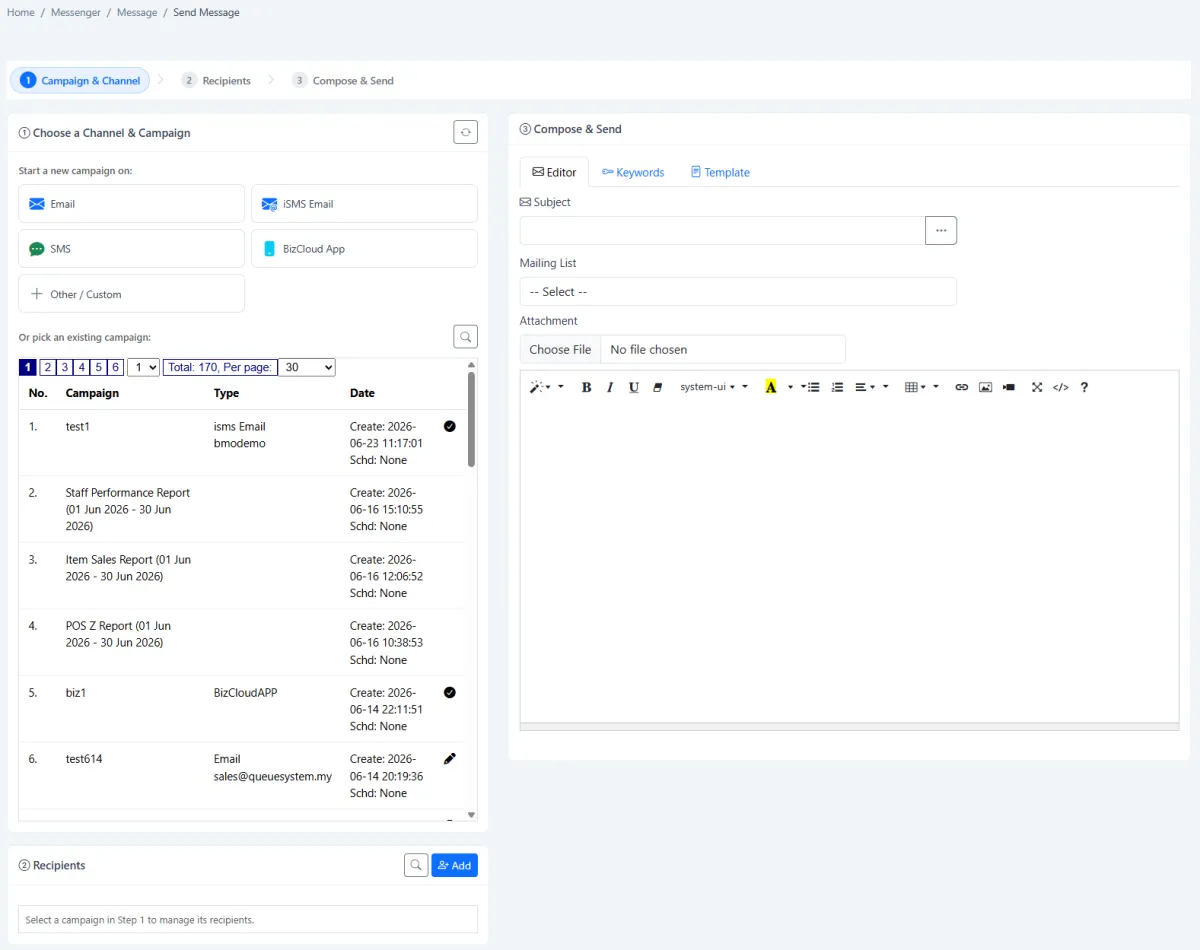
Guided sending
Campaign, audience, message. Then send.
A step-by-step workspace takes you from choosing the campaign and channel, to adding recipients, to writing the message. Start a new campaign or continue an existing one.
- Start a new campaign or reuse an existing one
- Search and add recipients, or pick a mailing list
- Reusable templates and keywords
- Send now or schedule for later
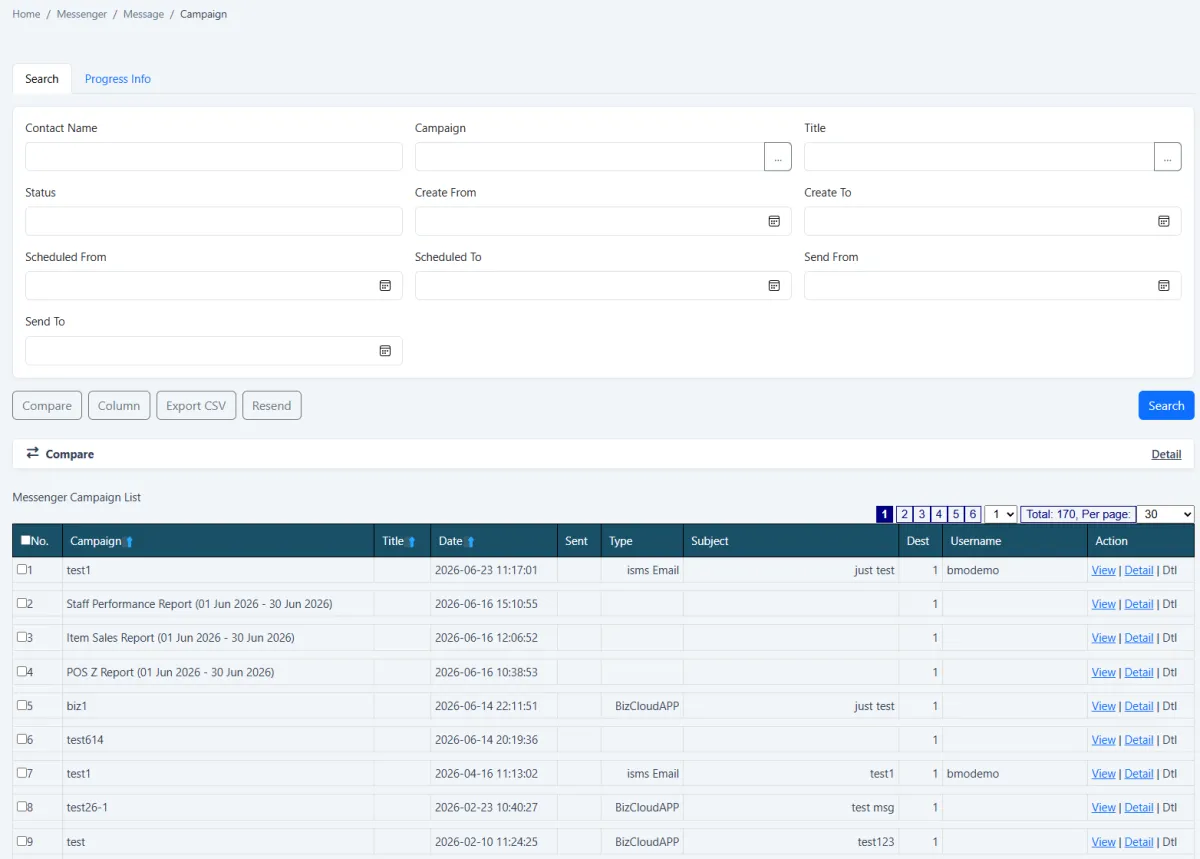
Campaign records
Know exactly what was sent, and to whom.
Every campaign is kept in a searchable register with its date, channel, destination count and sending account. Open the progress and detail, compare campaigns, export to CSV or resend when needed.
- Search by contact, title, status and date
- Campaign progress and delivery detail
- Compare campaigns and export to CSV
- Resend a campaign when required
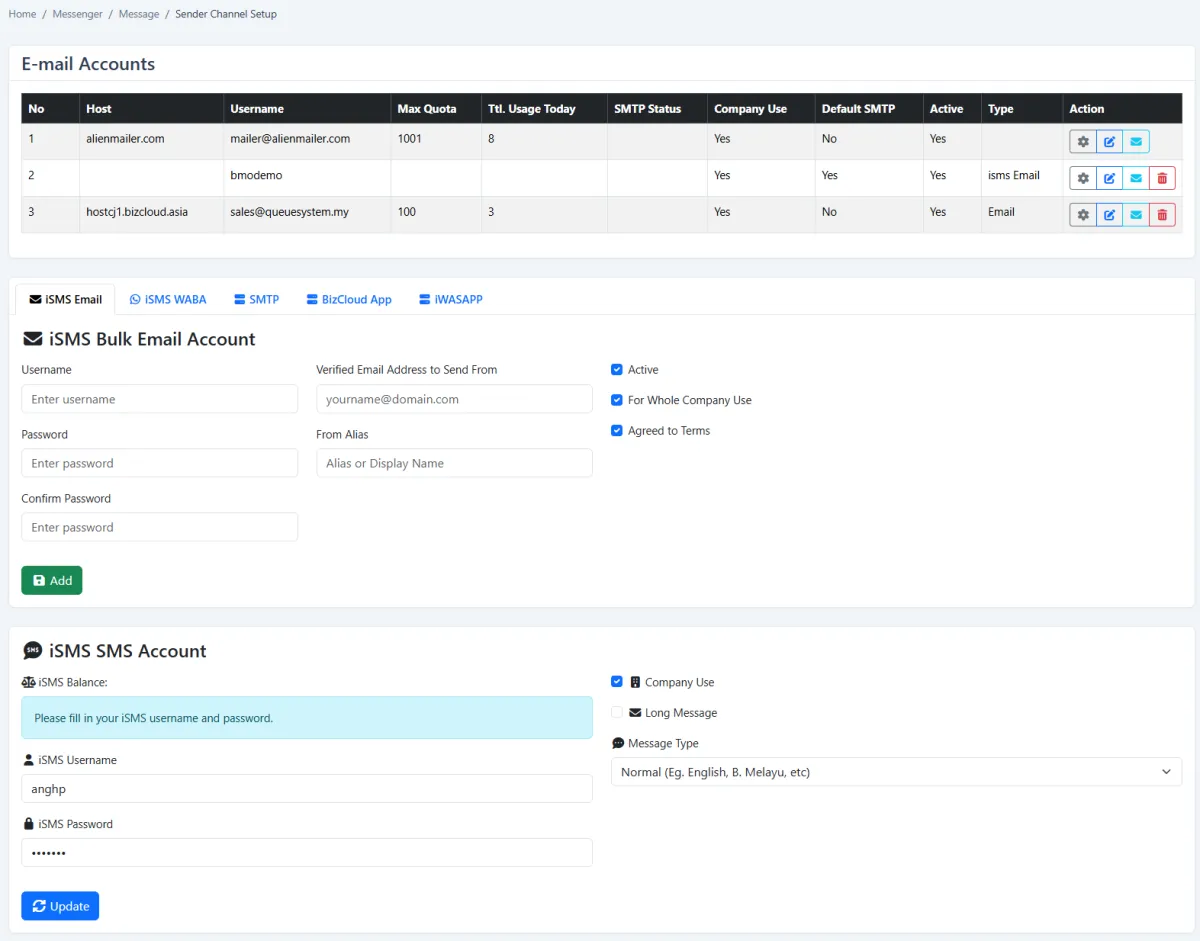
Sender control
One iSMS account, managed centrally.
Set up your iSMS SMS account once in iCRM. Administrators can check the credit balance, set normal or long-message behaviour and control which accounts the company can use.
- iSMS SMS account set up once
- Check SMS balance from iCRM
- Normal and long-message options
- Company-wide sender controls
How it works
From customer list to delivered SMS.
- 01 · Connect
Set up your iSMS account
Add your iSMS SMS account in iCRM and check your balance.
- 02 · Target
Choose your audience
Pick recipients or a mailing list built from your iCRM customer groups.
- 03 · Compose
Write the message
Use a template or write a new message. Keep it short and clear.
- 04 · Send
Send now or schedule
Deliver immediately or schedule the campaign for the best time.
- 05 · Review
Check the campaign record
See progress and detail, compare campaigns and export results.
- 06 · Repeat
Reuse what works
Continue an existing campaign or resend when a message needs to go out again.
Do customers need an app to receive SMS? +
No. SMS works on every mobile phone without an app or an internet connection, which is why it suits reminders and urgent notices.
Where do the recipient lists come from? +
From your iCRM customer data. You can search and add recipients or use a mailing list, so campaigns reach the customer groups you already manage in iCRM.
How is SMS charged? +
SMS is sent through your iSMS account and uses iSMS credits, separate from the iCRM plan. Contact us for current SMS rates and a recommendation for your volume.
Should we use SMS or WhatsApp? +
Many businesses use both. WhatsApp suits two-way conversations and rich messages. SMS reaches any phone and is ideal for short notices. In iCRM you can choose the channel for each campaign. See WhatsApp Business API.
SMS Marketing
Ready to reach your customers by SMS?
Tell us who you want to reach and what you want to send. We'll show you how it works in iCRM.